computer-science/big-o-how-to-tell-if-your-code-will-survive-1-000-times-more-data.md
Big O: how to tell if your code will survive 1,000 times more data
Your code works on 10 items, then crawls on 10,000. Big O is the short way programmers describe how the number of steps grows as the input grows.
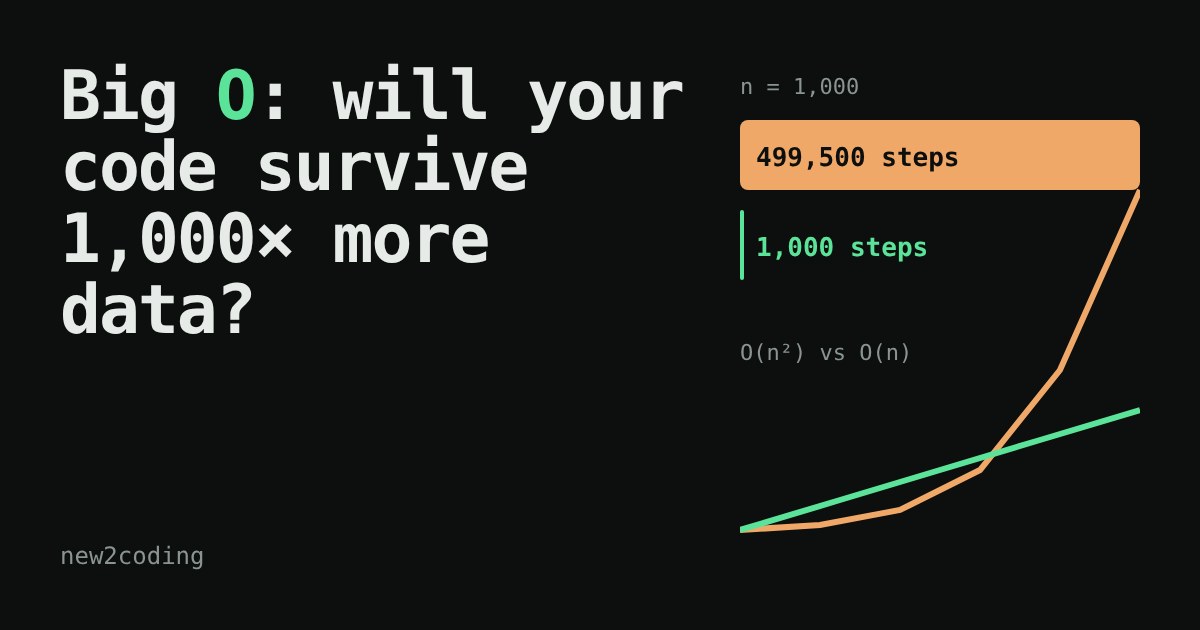
Run two duplicate-finders in your browser, count their real steps at four sizes, and see why a loop inside a loop turns 1,000 items into half a million steps while a set keeps it at 1,000.
Your program works on 10 items. It works on 100. Then someone gives it 10,000 and it takes minutes. Nothing is "broken": the code simply grows faster than you expected. Programmers have a short way to talk about this called Big O, and it is much simpler than its reputation.
Count steps, not seconds
How long code takes depends on your computer, your language and what else is running. So instead of seconds, we count steps: one comparison, one lookup, one addition. Then we ask a single question: when the input gets bigger, how fast does the number of steps grow?
We call the input size n. If you have 1,000 names in a list, n is 1,000. Big O is a label for the shape of the growth, written O(...) and read "order of". It ignores small details like "plus 3 steps" and keeps only what dominates when n gets large.
Two ways to find a duplicate
Here is a real problem: does a list contain the same value twice? The first version compares every item with every item after it.
def has_duplicate_slow(items):
    steps = 0
    for i in range(len(items)):
        for j in range(i + 1, len(items)):
            steps += 1                      # one comparison
            if items[i] == items[j]:
                return True, steps
    return False, steps
The second version walks the list once and remembers what it has seen in a set, a collection that can answer "have I seen this?" in about one step regardless of its size (the hash tables article explains how).
def has_duplicate_fast(items):
    steps = 0
    seen = set()
    for x in items:
        steps += 1                          # one look-up
        if x in seen:
            return True, steps
        seen.add(x)
    return False, steps
We ran both in Python on lists with no duplicates (the worst case, because they must check everything). The step counts were:
| n | slow | fast |
|---|---|---|
| 10 | 45 | 10 |
| 100 | 4,950 | 100 |
| 1,000 | 499,500 | 1,000 |
Look at what happened when n grew 10 times. The fast version grew 10 times too. The slow version grew about 100 times. That is the whole idea of Big O.
Try it yourself
The figure below runs both functions for real, in your browser, and counts the steps. Pick a size and watch the bars.
The common shapes
Most code you meet falls into a handful of shapes. Here is how many steps each takes (the "log" ones use base 2, rounded up):
| Name | Big O | n = 10 | n = 1,000 | n = 1,000,000 |
|---|---|---|---|---|
| constant | O(1) | 1 | 1 | 1 |
| logarithmic | O(log n) | 4 | 10 | 20 |
| linear | O(n) | 10 | 1,000 | 1,000,000 |
| n log n | O(n log n) | 40 | 10,000 | 20,000,000 |
| quadratic | O(n²) | 100 | 1,000,000 | 1,000,000,000,000 |
Each has a familiar example. Reading items[0] is O(1): the list can be any size and it is one step. Binary search (covered here) is O(log n): doubling the list adds only one more guess. A single loop over a list is O(n). Good sorting algorithms are O(n log n). A loop inside a loop over the same data is O(n²), which is exactly what our slow function did.
Notice the last column. A million items is nothing for a linear loop, but a quadratic one needs a trillion steps. That is the gap between "instant" and "go make a coffee, then lunch".
What Big O does not say
Big O is a guide to growth, not a stopwatch. For tiny inputs, a simple O(n²) loop can beat a clever O(n) method, because the clever one has setup costs. Two O(n) functions can still differ by a factor of 50 in real time. And Big O usually describes the worst case: our duplicate checkers stop early if they find a repeat on the first look.
So what should you do with this?
You do not need to calculate anything formally. Build one habit: when you write a loop, ask what is inside it. If the answer is "another loop over the same data" (or a call that secretly loops, like searching a list with in), you have probably written O(n²). That is fine for 50 items and worth a second look for 50,000. Often, as in our example, the fix is a better container, such as a set or dictionary, rather than cleverer code.