computer-science/hash-tables-how-a-computer-finds-one-name-among-thousands-without-chec.md
Hash tables: how a computer finds one name among thousands without checking them all
Your phone finds one contact among thousands without reading them all. The trick is a hash table: a row of numbered slots and a small calculation that turns any name into a slot number.
Build a tiny one in Python, run the same table in your browser, and watch two names land in the same slot. Learn what a hash function, a collision and chaining are, and why Python's hash() changes every time you start it.
The question
Your phone has 2,000 contacts. You type "Ada" and her number appears instantly. The phone did not read every contact from the top until it found her. How can a computer jump straight to the right entry?
The trick is a hash table: a list of numbered slots, plus a recipe that turns any name into a slot number. Python calls its version a dict, JavaScript has Map and plain objects, and Ruby has Hash. They all rest on this idea.
The slow way: look at everything
Suppose contacts live in a plain list. To find "zed" the computer compares it with the first name, then the second, and so on. If the list has 100,000 names and the one you want is last, that is 100,000 comparisons. Twice the data means twice the work. (If "Big O" is new to you, it is the name for this "work grows with the data" idea.)
The fast way: let the key choose the slot
A key is what you look things up by (the name). A value is what you get back (the phone number). A hash function takes a key and returns a number. The same key always gives the same number.
Here is a deliberately simple one. Give each letter a score (a=1, b=2, c=3 and so on), add the scores, then keep only the remainder after dividing by the number of slots. The remainder operator is %, and it wraps any number into the range from 0 to slots-1.
def my_hash(key, size):
    return sum(ord(c) - 96 for c in key) % size

# "ada": 1 + 4 + 1 = 6      6 % 8 = 6   -> slot 6
# "bob": 2 + 15 + 2 = 19   19 % 8 = 3   -> slot 3
To store "ada", compute her slot and put her there. To find her later, compute the slot again and look in that one place. No searching, because the key tells you where to look. The size of the data hardly matters: one calculation, one look.
The catch: two keys, one slot
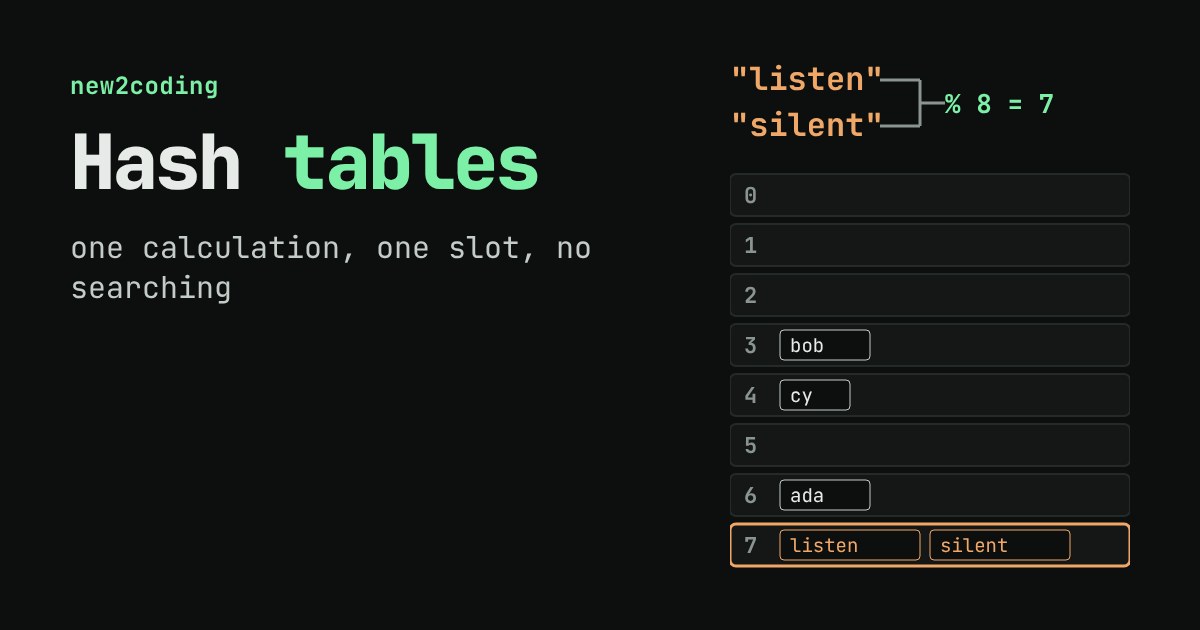
There are only 8 slots but endless possible names, so sooner or later two keys land in the same slot. This is called a collision. With our letter-adding hash it happens easily: "listen" and "silent" use the same letters, so they get the same total.
A common fix is chaining: each slot holds a small list. Both names go in slot 7. When you look up "silent", you jump to slot 7 and compare against the few entries there. Here is a tiny table that does exactly that, and what it prints when I ran it with Python 3.13:
class ToyTable:
    def __init__(self, size=8):
        self.buckets = [[] for _ in range(size)]

    def put(self, key, value):
        bucket = self.buckets[my_hash(key, len(self.buckets))]
        for pair in bucket:
            if pair[0] == key:      # key already there: replace
                pair[1] = value
                return
        bucket.append([key, value])

    def get(self, key):
        bucket = self.buckets[my_hash(key, len(self.buckets))]
        checks = 0
        for k, v in bucket:
            checks += 1
            if k == key:
                return v, checks
        return None, checks
t = ToyTable(8)
# put ada, bob, cy, listen, silent
0 []
1 []
2 []
3 ['bob']
4 ['cy']
5 []
6 ['ada']
7 ['listen', 'silent']
t.get("silent") -> (5555, 2) # 2 comparisons
t.get("zed") -> (None, 1) # missing: still only 1 comparisonTry it yourself
Below is the same table, running in your browser. Add names and watch where they land. Use the buttons to change the number of slots and see how collisions change.
Two things to try. First, add "listen" and "silent" and watch them share a slot. Second, switch from 8 slots to 16: names move, because % 16 gives different remainders than % 8. Real hash tables do the same thing on purpose. When a table gets too full, it makes a bigger one and re-places every key, so chains stay short.
What real languages do differently
Our hash function is a teaching toy. Real ones mix the bits of the key so that similar keys, like "listen" and "silent", rarely collide. Python's dict does not use chaining either; it uses a different strategy called open addressing, where a colliding key takes another slot in the same array. The idea of "compute a slot from the key" is the same.
One thing surprises beginners. In Python, the hash of a string is different each time you start the program:
$ python3 -c "print(hash('ada'))"
-5701365071427411813
$ python3 -c "print(hash('ada'))"
-7535356905685601227
That is on purpose: Python randomises string hashes per process (you can pin it with the PYTHONHASHSEED environment variable) so that an attacker cannot craft many keys that all collide and slow a server down. Inside one run, the same key always gets the same hash, which is all a table needs. It also means you should never save a hash() result to a file and expect it to match tomorrow.
How much faster is it?
I timed a search for the last of 100,000 names, once with "user99999" in names on a list and once on a dict holding the same names. In one run on a cloud machine the dict lookup was thousands of times faster (about 14,000x; your number will differ). The list had to compare up to 100,000 names, the dict did one hash and a handful of comparisons.
So what for your own code?
If you ever write a loop to find "the item whose name is X" in a big list, and you do it many times, a dict keyed by name is usually the better tool. Two limits to know. Keys must be things that cannot change underneath the table, which is why Python allows strings, numbers and tuples as keys but not lists. And a dict gives fast lookup by exact key, not "everything that starts with A" or "everything in alphabetical order"; for those you need other structures.
Next time you see {"ada": 1111} in code, picture eight numbered slots and a small calculation deciding which one to open.