computer-science/breadth-first-search-how-a-maze-solver-finds-the-shortest-way-out.md
Breadth-first search: how a maze solver finds the shortest way out
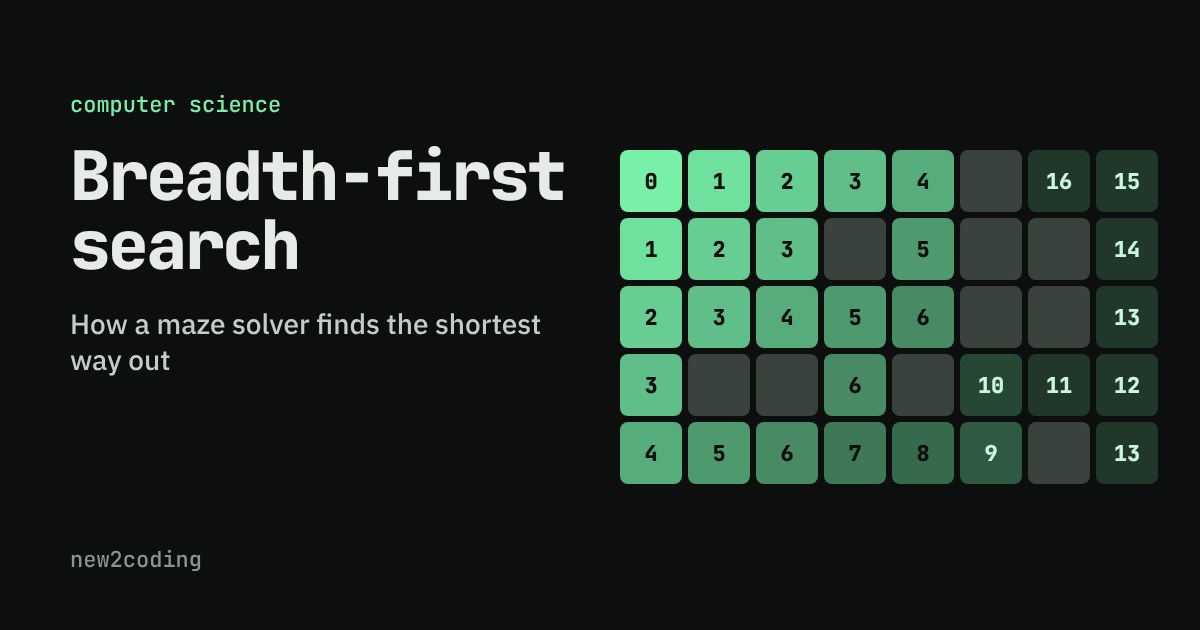
How does a maze solver, or a map app, find the shortest route and not just any route? The answer is breadth-first search: explore every square one step away, then every square two steps away, and so on outward in rings.
The only ingredient is a queue, a waiting list where the oldest item is always taken first. Step through a maze square by square, draw your own walls, then swap the queue for a stack and watch the route get longer. Includes a short Python version that really runs.
How does a maze solver find the shortest way out?
Imagine you are standing in a maze and you want the shortest route to the exit, not just any route. You could wander and hope. Or you could be systematic: look at every square one step away, then every square two steps away, then three, and so on. The first time your search touches the exit, you have found a shortest route, because you checked every closer square first.
That idea is called breadth-first search, or BFS. It is one of the most useful ideas in programming. The same trick finds the fewest stops on a subway map, the fewest clicks between two web pages, and the "degrees of separation" between two people in a social network. All of those are the same problem in disguise: a set of places, and links between them.
The one thing you need: a queue
To search in rings, the computer needs a to-do list of squares it has found but not yet explored. The rule for that list is the whole trick: always take the oldest item first. A list that works this way is called a queue, just like a line at a shop. The first one in line is the first one served, and newcomers join at the back.
Why does that produce rings? The start square is explored first, and its neighbours join the back of the queue. Those neighbours are explored before anything found later, and the squares they discover join behind them. So every square one step away is explored before any square two steps away, and so on outward. The queue keeps the rings in order without you doing anything extra.
Try it: draw walls and watch the queue
The grid below is a small maze. Press Step to explore one square at a time. Orange squares are in the queue (found, waiting). Green squares are done, and the number on each one is its distance from the start in steps. Tap squares to build your own walls, or choose Move S or Move G to relocate the start and the goal. Try boxing in the goal and see what happens.
With the queue, watch the distance numbers: every square showing 3 is explored before any square showing 4. Now press Reset, switch to Stack, and run it again. A stack takes the newest item first, so the search charges down one corridor as far as it can before coming back. On this maze it still finds a way to the goal, but the route it reports is 21 steps instead of 13, and nothing promises a stack's route is short. Only the queue's "oldest first" rule gives you shortest routes.
The same idea in Python
Here is the whole algorithm for a maze written as lines of text, where # is a wall, S the start and G the goal. Python's collections.deque is a queue that is fast at both ends: popleft() takes from the front and append() adds to the back.
from collections import deque

maze = [
    "S....#..",
    "...#.##.",
    ".....##.",
    ".##.#...",
    "......#G",
]

def find(ch):
    for r, row in enumerate(maze):
        if ch in row:
            return (r, row.index(ch))

def shortest_path(start, goal):
    queue = deque([start])          # cells waiting to be explored
    came_from = {start: None}       # also our "already seen" list
    while queue:
        r, c = queue.popleft()      # take from the FRONT
        if (r, c) == goal:
            break
        for dr, dc in [(-1,0),(1,0),(0,-1),(0,1)]:
            nr, nc = r + dr, c + dc
            inside = 0 <= nr < len(maze) and 0 <= nc < len(maze[0])
            if inside and maze[nr][nc] != "#" and (nr, nc) not in came_from:
                came_from[(nr, nc)] = (r, c)
                queue.append((nr, nc))   # join at the BACK
    if goal not in came_from:
        return None
    path, cell = [], goal
    while cell is not None:
        path.append(cell)
        cell = came_from[cell]
    return path[::-1]

path = shortest_path(find("S"), find("G"))
print("steps:", len(path) - 1)
print(path)
Running it prints the answer below. Each pair is (row, column), counting from 0 at the top left.
steps: 13
[(0, 0), (1, 0), (2, 0), (3, 0), (4, 0), (4, 1), (4, 2), (4, 3), (4, 4), (4, 5), (3, 5), (3, 6), (3, 7), (4, 7)]
Three details that matter
Remember where you have been. The dictionary came_from does two jobs. Its keys are the squares already found, so the not in came_from check stops the search from adding a square twice or walking in circles. Its values record which square each one was discovered from. Without the "already seen" check, a maze with a loop would make the program run forever.
Walking back to get the route. The search itself only answers "can I reach the goal?" To get the route, start at the goal, follow came_from back to the start, and reverse the list. This is the loop at the bottom of the function.
No route is an answer too. If the queue becomes empty and the goal was never found, every reachable square has been checked and the goal is not among them. The function returns None. In the grid above, wall in the goal and press Run to see exactly this.
How much work is it?
Each square is added to the queue at most once, and each square is looked at from at most four directions. So the work grows in step with the number of squares: a maze ten times bigger takes roughly ten times longer, not a hundred times. Computer scientists write this as O(n), where n is the number of squares (more generally, the number of places plus the number of links between them). The cost is memory: the queue can hold a whole ring of squares at once.
So what, for your own code?
Reach for BFS when every step costs the same and you want the fewest steps: shortest routes in a grid, fewest moves in a puzzle, fewest hops between two items in a network. If steps have different costs, such as roads of different lengths, "fewest steps" is no longer "cheapest trip", and you need a relative of BFS such as Dijkstra's algorithm, which also uses a waiting list but picks the cheapest item instead of the oldest. When you only need to know whether something is reachable, or you want to visit everything, a stack-based search works too. The takeaway is small but powerful: which item you take from the waiting list decides what kind of search you get.