infrastructure/percentiles-why-an-average-response-time-of-235-ms-can-hide-users-wait.md
Percentiles: why an average response time of 235 ms can hide users waiting 3 seconds
Your dashboard says the average response time is 235 milliseconds, yet some users wait three seconds. Both can be true, because an average hides the slow requests.
Click squares to slow down requests and watch the mean, median, p95 and p99 react differently. Then run the same experiment in Python and learn which number to ask for next time.
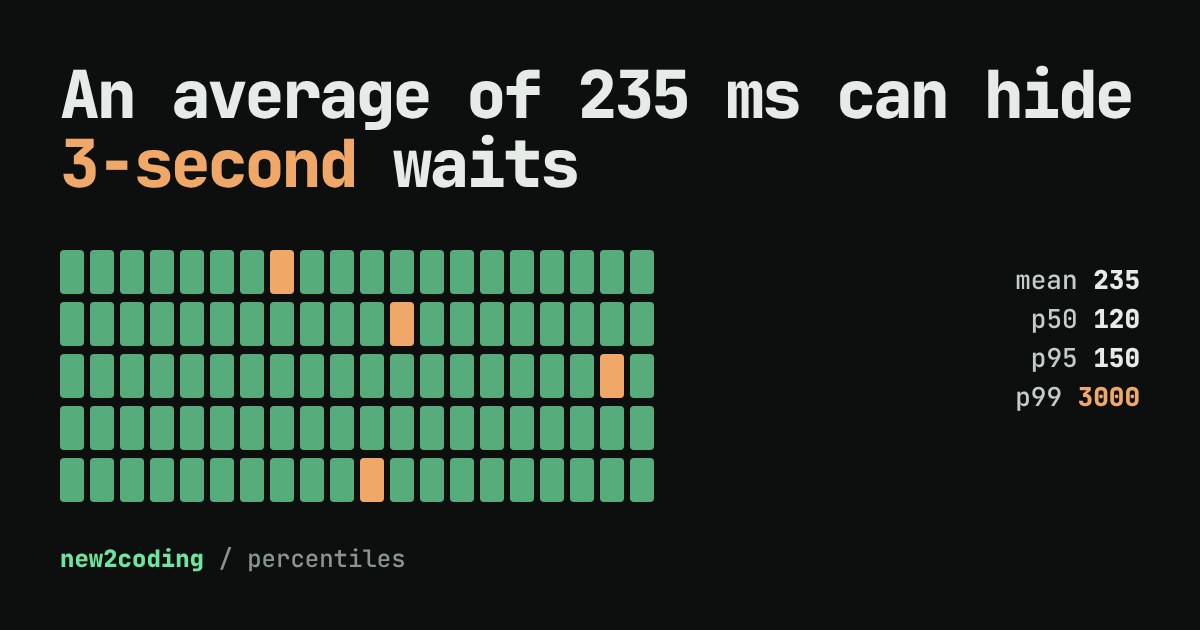
Your monitoring dashboard says the average response time of your website is 235 milliseconds. That sounds fine. Yet a few users keep writing in to say the site "hangs for three seconds." Both things can be true at once, and the reason is the most useful idea in monitoring: an average hides the slow requests, and the slow requests are the ones people remember.
What an average does to a bad day
A request is one visit to a server: your browser asks for a page and waits. The time it waits is the latency, usually measured in milliseconds (ms, a thousandth of a second).
Imagine 100 requests. Ninety-six of them take between 90 and 150 ms. Four of them get stuck behind a slow database query and take 3,000 ms each. Add everything up and divide by 100, and you get an average (also called the mean) of about 235 ms. Not one request actually took 235 ms. The number describes nobody's real experience: it is too slow for the 96 happy users and far too fast for the 4 unhappy ones.
Percentiles: sort first, then look at a position
A percentile answers a different question: "what latency did most requests beat?" To find it, sort all the requests from fastest to slowest and look at a position in the line.
- p50 (the median) is the middle of the line: half the requests were faster, half slower. It describes the typical visit.
- p95 is the value 95% of the requests were at or under. Five in every hundred were slower than this.
- p99 is the same idea at 99%: only one in a hundred was slower. It shows what your unluckiest regular users see.
Teams often write alerts and promises (a "service level objective") using these numbers, such as "p95 under 300 ms", because they track what users feel much better than a mean does.
Try it: click a request to make it slow
Below are 100 requests, one square each. Green ones take 90 to 150 ms. Click any square to make it a 3,000 ms request (it turns orange), and click again to fix it. Watch which numbers move, and which ones stay put.
Two things are worth noticing. First, the median barely moves, even with 20 slow requests: it only shifts a lot once slow requests are a large share of the line. Second, a single slow request moves the mean by about 30 ms but does not touch p95 or p99 at all. With 100 requests, p99 is the 99th value in the sorted line, and one slow request sits at position 100. That is why dashboards usually show the slowest value (the max) next to the percentiles.
The same thing in Python
Here is the experiment from the top of the page. We build 100 latencies, make four of them slow, then compute the mean and three percentiles. math.ceil rounds up to a whole number, which gives us the position in the sorted line.
import math

# 100 requests: most take 90-150 ms, four take 3000 ms
times = [90 + (i * 37) % 61 for i in range(100)]
for i in (7, 31, 58, 90):
    times[i] = 3000

def percentile(values, p):
    ordered = sorted(values)
    rank = math.ceil(p / 100 * len(ordered))   # nearest-rank method
    return ordered[rank - 1]

print("mean", sum(times) / len(times))
print("p50 ", percentile(times, 50))
print("p95 ", percentile(times, 95))
print("p99 ", percentile(times, 99))
Running it prints:
mean 234.85
p50  120
p95  150
p99  3000
The mean says 235, p50 and p95 say the site is quick, and only p99 notices the four bad requests. Each number answers a different question, which is why people read them together.
One more wrinkle: different tools, slightly different answers
The nearest-rank method above always returns a latency that really happened. Other tools, such as NumPy's percentile function or a monitoring system, may blend two neighbouring values (this is called interpolation), so the same data can give a slightly different p95. They agree on the idea; they differ at the edges. When you compare numbers between two dashboards, check how each one computes them.
What to take into your own code
When someone tells you "the average response time is fine", ask for the p95 and the p99. When you measure your own program, collect every timing and sort them rather than keeping only a running total. And if one in a hundred of your requests is slow, remember that a visitor who loads a page with 30 files makes 30 requests, so a rare slow case is not so rare for them. Most monitoring tools can chart p50, p95 and p99 for exactly this reason.