infrastructure/environment-variables-how-the-same-code-talks-to-a-practice-database-o.md
Environment variables: how the same code talks to a practice database on your laptop and the real one online
The same program can talk to a practice database on your laptop and the real one on a live website, without a single edit to its code. The trick is the *environment variable*: a named piece of text the computer hands to a program when it starts.
Try it on two pretend computers, untick a variable and watch the program stop with a clear error. Along the way you will meet the "False" is true trap, the choice between a default and a loud failure, and why secrets stay out of Git.
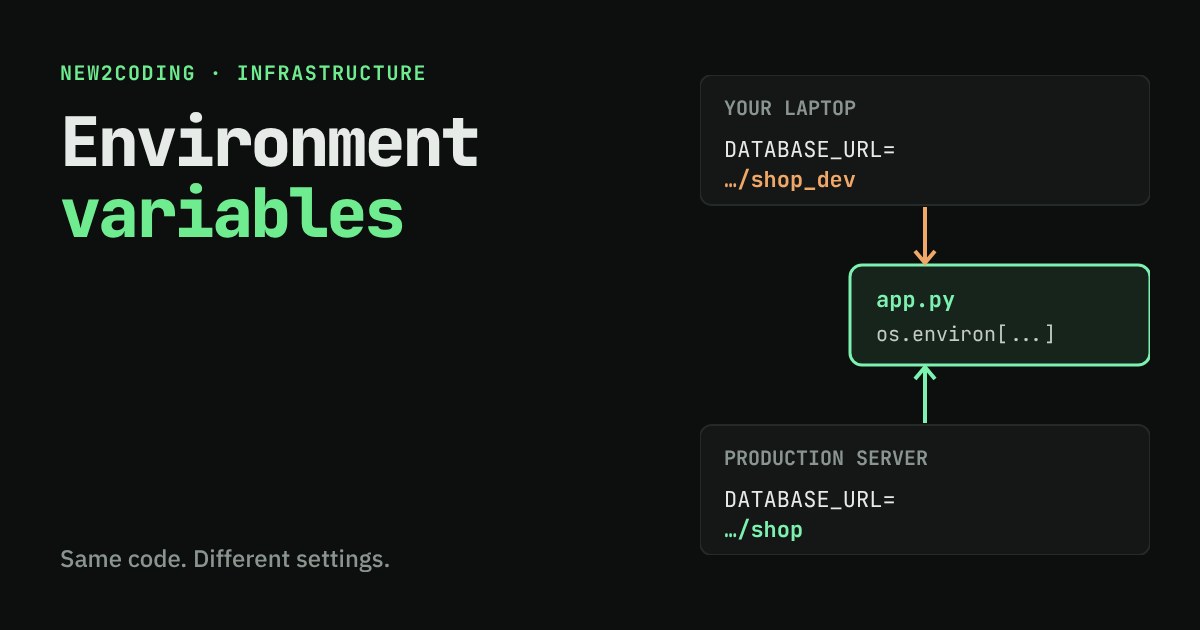
You write a program that talks to a database. On your laptop it should use a practice database full of fake customers. On the real website it must use the real database. The code is the same in both places. So how does the program know which database to use, without you editing the code every time you move it?
The answer is a small, old idea called an environment variable.
A setting that lives outside your code
An environment variable is a named piece of text that the computer hands to a program when the program starts. It has a name and a value, like DATABASE_URL and postgres://localhost/shop_dev. Every program that runs gets its own copy of the variables, and it can read them but never needs to know where they came from.
In a Mac or Linux terminal you can set a variable for one run by putting it in front of the command:
DATABASE_URL=postgres://localhost/shop_dev python app.py(In Windows PowerShell the same idea is written $env:DATABASE_URL = "postgres://localhost/shop_dev" on its own line before the command.) A hosting service has a settings page where you type the same names and values for your live site. The code never changes. Only the variables around it do.
Reading them in Python
Here is a tiny program. It reads three variables and prints what it would do. The fake addresses use example.com, a name reserved for examples, so nothing here points at a real server.
import os
from urllib.parse import urlparse

url = os.environ["DATABASE_URL"]
port = int(os.environ.get("PORT", "8000"))
debug = os.environ.get("DEBUG") == "1"

db = urlparse(url)
print("Database:", db.path.lstrip("/"), "on", db.hostname)
print("Listening on port", port)
print("Debug pages:", "ON" if debug else "off")
os.environ works like a dictionary of text. The line with square brackets, os.environ["DATABASE_URL"], demands the variable: if it is missing, Python stops with an error. The .get("PORT", "8000") version offers a default: if PORT is missing, use "8000". Which one to use is a real decision, and we will come back to it.
Try it: same code, two machines
Below is that exact program running on two pretend computers. Each has its own variables. Untick a variable to remove it, or type a new value, and watch what the program does.
Three things are worth noticing. The laptop talks to shop_dev and the server talks to shop, from identical code. Removing DATABASE_URL stops the program at once, with a clear message naming the missing variable. And PORT being unset is fine, because the code has a default.
Why not write it in the code?
You could type the address straight into app.py. There are three problems with that. First, you would need to edit the code to move it between machines, and it is easy to forget and point your practice run at real data. Second, your code is usually copied everywhere: into Git, to teammates, to hosting services. Third, and most serious, a setting like a database password would be saved in Git's history, and deleting the line later does not remove it from older saves. Keeping settings outside the code solves all three.
Three habits that save beginners
1. Values are always text
An environment variable holds text, never a number or a true/false. So PORT arrives as "8080" and has to be turned into a number with int(...). The sneaky case is true/false. Here is a real run:
import os

os.environ["DEBUG"] = "False"          # pretend the setting is "False"
print(repr(os.environ["DEBUG"]))       # values are always text
print(bool(os.environ["DEBUG"]))       # any non-empty text is truthy
print(os.environ["DEBUG"] == "1")      # compare to an exact word instead
Output:
'False'
True
False
The word "False" is still text, and in Python any non-empty text counts as true. So bool("False") is True, the opposite of what you meant. Comparing to one exact word, like == "1", avoids the trap.
2. Decide: crash early, or fall back?
import os

print(os.environ.get("PORT", "8000"))   # missing: use the default
try:
    os.environ["DATABASE_URL"]          # missing: no default
except KeyError as e:
    print("KeyError:", e)
Run without either variable set, it prints:
8000
KeyError: 'DATABASE_URL'
A harmless setting such as a port can have a default. Something where a wrong guess is dangerous, like which database to connect to, is better as a loud failure at startup than a quiet guess. Imagine a default that points at the real database, used by accident on someone's laptop.
3. Keep secrets out of the code and out of Git
Passwords and keys belong in variables, not in saved code. For local work, many people put them in a plain text file named .env with one NAME=value per line, and add .env to a file called .gitignore, which tells Git to never save it. Python needs a small helper library to load such a file (python-dotenv is a common one). Node.js can load one itself: since version 20.6 you can run node --env-file=.env app.js.
One more fact that surprises people: a program gets its variables when it starts. If you change a variable afterwards, a program that is already running will not notice. Restart it.
What to take away
Code says what to do. Environment variables say where and with which keys. Read each one, remember it is text, choose a default only when a wrong guess is harmless, and keep anything secret out of Git. The next time a tutorial says "set your environment variables", you will know it means: tell the program about the world around it before it starts.