databases/caching-why-the-second-read-is-fast-and-how-a-copy-goes-stale.md
Caching: why the second read is fast, and how a copy goes stale
Why does a page load slowly the first time and fast the second? Usually a cache: a quick copy of an answer the database already gave.
Run a real Python cache-aside example, then play with a live cache: watch hits and misses, set the TTL, change the database, and see the moment a cache serves an answer that is out of date.
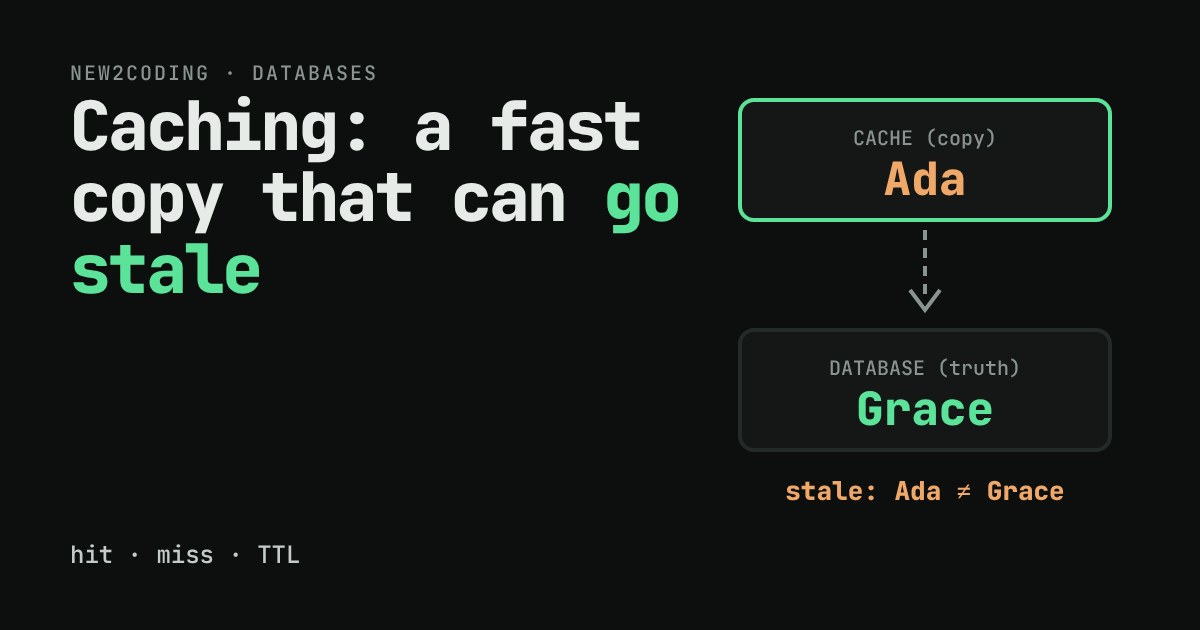
You open a profile page. It takes a moment. You refresh it, and it appears almost instantly. Nothing about your code changed between those two loads, so what did? Very often the answer is a cache: a small, fast place where a program keeps a copy of an answer it already worked out. This article shows how a cache sits in front of a database, why it makes the second read cheap, and the one price you pay for it: the copy can go out of date.
Why asking the database costs something
A database lives on disk, usually on another machine. To answer "what is the name of user 1?" your program sends a message over a network, the database finds the row, and a reply travels back. Even a well-indexed lookup typically takes a millisecond or more once the trip is included. Looking a value up in a variable in your own program's memory takes a tiny fraction of that. So if the same question gets asked a thousand times, it is tempting to ask the database once and remember the answer.
The cache-aside pattern
The most common way to do this is called cache-aside (also "lazy loading"). The cache sits to the side of the database, and your code is in charge of both:
- Look in the cache. If the answer is there, that is a hit: return it and stop.
- If it is not there, that is a miss: ask the database.
- Save the database's answer in the cache, then return it.
Here it is in Python, using a built-in SQLite database and a plain dictionary as the cache. The clock is fake (now is just a number we set ourselves) so the output is the same every time:
import sqlite3

db = sqlite3.connect(":memory:")
db.execute("CREATE TABLE users (id INTEGER PRIMARY KEY, name TEXT)")
db.execute("INSERT INTO users VALUES (1, 'Ada')")

cache = {}          # id -> (value, expires_at)
TTL = 5             # seconds
now = 0             # a fake clock so the demo is repeatable

def get_name(user_id):
    entry = cache.get(user_id)
    if entry and entry[1] > now:
        return entry[0], "hit"
    row = db.execute("SELECT name FROM users WHERE id = ?", (user_id,)).fetchone()
    cache[user_id] = (row[0], now + TTL)
    return row[0], "miss"

print(get_name(1))
print(get_name(1))
db.execute("UPDATE users SET name = 'Grace' WHERE id = 1")
print(get_name(1))
now = 6
print(get_name(1))
Running it prints:
('Ada', 'miss')
('Ada', 'hit')
('Ada', 'hit')
('Grace', 'miss')
Read those four lines slowly. The first call is a miss, so the database is asked. The second is a hit, which is the fast path. Then the name is changed to Grace in the database, yet the third call still answers Ada. That is not a bug in the code; it is the deal you made. The cache is a copy, and nobody told the copy about the change.
TTL: letting copies expire
The TTL in the code stands for time to live. Each saved answer gets an expiry time (now + TTL). Once the clock passes it, the entry counts as missing and the next read goes back to the database, which is what happened on the last line, once now reached 6.
The TTL is a trade-off you choose. A long TTL means more hits and fewer questions for the database, but a longer time during which people can see old data. A short TTL means fresher data but more misses. For a value that rarely changes, like a country list, a long TTL is fine. For a bank balance, caching may not be acceptable at all.
Try it yourself
Three ways to cope with stale data
Accept it for a while. If showing a name that is a few seconds old harms nobody, a TTL alone is simple and often enough.
Invalidate on write. When your code changes the row, it also deletes the cache entry (the "Delete cache entry" button above). The next read misses and loads the fresh value. This keeps copies fresh but means every place that writes must remember to do it, and forgetting is a classic source of bugs.
Don't cache it. Some data, such as a balance or the stock left of a product, is worth the cost of always asking.
What to take away
A cache trades correctness-right-now for speed. Before caching anything, ask two questions: how often is this read compared with how often it changes, and how wrong can it be, and for how long, before someone is harmed? Real systems use dedicated cache servers such as Redis or Memcached, and your database and operating system keep caches of their own too, but the idea you just played with is the same everywhere: check the copy, fall back to the source, and decide how long to trust the copy.