databases/sql-indexes-why-finding-one-row-among-200-000-takes-about-18-steps.md
SQL indexes: why finding one row among 200,000 takes about 18 steps
A database with 200,000 customers can answer "find this email" by reading every row, or by reading about 18 entries. The difference is an index: a sorted copy of one column that lets the database halve the search at every step.
Watch a table scan and an index lookup race side by side, see the real `EXPLAIN QUERY PLAN` output from SQLite, and learn what indexes cost and when they don't help.
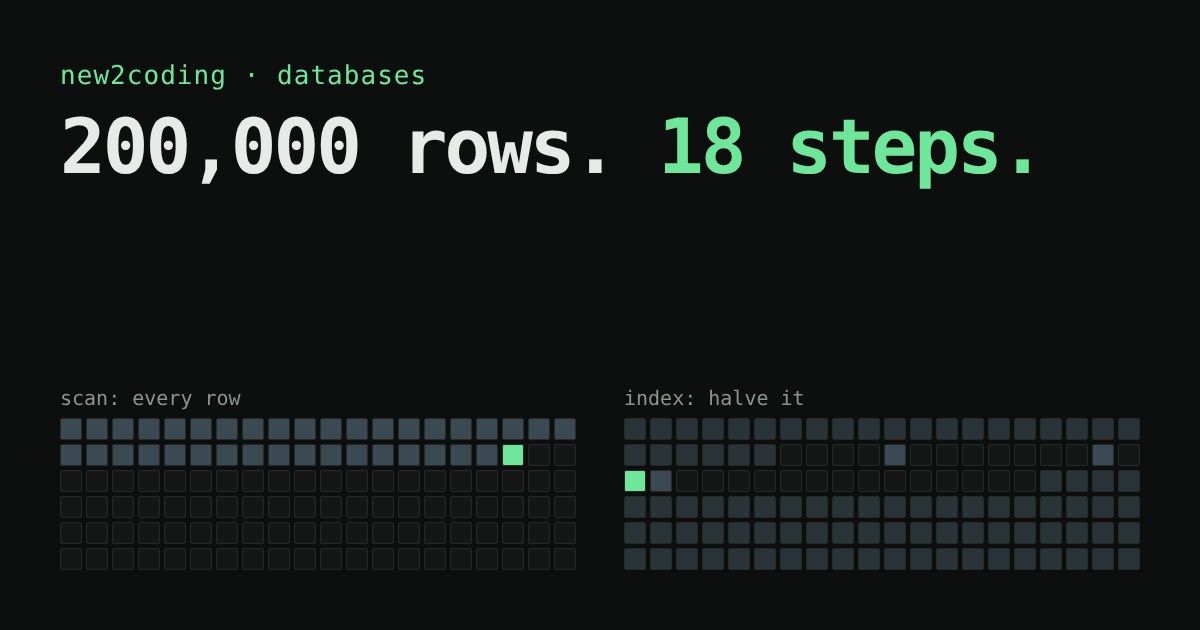
You type an email address into a login box and the page answers in a blink. Behind it sits a table with 200,000 customers. Did the database read all 200,000 rows to find yours? Without help, yes. With one small addition called an index, it reads about 18. This article shows the difference and lets you watch it happen.
The slow way: read every row
A database table is a list of rows stored in the order they were added. If you ask for the customer whose email is [email protected], the database has no idea where that row is. The emails are not in any useful order. So it starts at the first row, compares, moves to the second, compares, and carries on. This is called a full table scan.
Scanning is fine for 50 rows. For 200,000 rows it means 200,000 comparisons for a single lookup, and every extra user makes every lookup slower.
The fast way: keep a sorted copy
Think of the index at the back of a textbook. You don't read the book to find "photosynthesis": you look in an alphabetical list, which tells you the page. A database index is the same idea. It is a separate structure holding the values of one column in sorted order, each paired with the location of its row.
Sorted order unlocks binary search: look at the middle entry. If your value is smaller, throw away the upper half; if larger, throw away the lower half. Repeat. Each step halves what is left, so 200,000 entries need at most 18 steps (because 218 is 262,144, which is more than 200,000). Real databases use a close cousin of this idea called a B-tree, which is tuned for disks, but the halving intuition carries over.
Try it: scan versus index
Try a row near the end of the table: the scan checks nearly all 400 squares, while the index never needs more than 9 steps. Even if you are lucky and pick a row at the very start, the index stays quick. The scan only wins by luck, and the index wins every time as the table grows.
What it looks like in a real database
Here is a real run using Python's built-in sqlite3 module (SQLite 3.45). It builds the 200,000-row table, asks the database how it plans to answer, adds an index, and asks again:
import sqlite3
db = sqlite3.connect(":memory:")
db.execute("CREATE TABLE customers (id INTEGER PRIMARY KEY, name TEXT, email TEXT, city TEXT)")
# ... insert 200,000 rows ...
q = "SELECT * FROM customers WHERE email = '[email protected]'"
print(db.execute("EXPLAIN QUERY PLAN " + q).fetchall()[0][3])
db.execute("CREATE INDEX idx_email ON customers(email)")
print(db.execute("EXPLAIN QUERY PLAN " + q).fetchall()[0][3])
Output:
SCAN customers
SEARCH customers USING INDEX idx_email (email=?)
EXPLAIN QUERY PLAN is a way of asking the database "how will you do this?" without running it. SCAN means every row; SEARCH ... USING INDEX means it jumps straight to the match. On one laptop run the scan took about 10 milliseconds and the indexed lookup about 0.02 milliseconds. Your numbers will differ, but the gap is the point. Other databases such as PostgreSQL and MySQL have their own EXPLAIN command that shows the same idea.
Indexes are not free
If indexes are so good, why not index everything? Three reasons:
They take space. An index is a second copy of a column's values, plus pointers.
They slow down writes. Every time you add or change a row, the database must also update each index on that table so it stays sorted.
They only help certain questions. An index on email helps WHERE email = '...'. It does not help a search for emails containing a piece of text, such as WHERE email LIKE '%150000%', because sorted order only helps when you know how the value starts. In the same SQLite test, that query still showed SCAN customers even with the index in place.
So what for your own code?
When a query feels slow, don't guess. Ask the database for its plan, look for a scan on a big table, and consider an index on the column in the WHERE clause (or in a JOIN). Many databases create an index for you on the primary key, which is why looking up a row by its id is usually fast already. Add indexes for the lookups you actually do often, and leave the rest alone.