networks/cidr-and-subnets-what-the-24-in-192-168-1-0-24-means.md
CIDR and subnets: what the /24 in 192.168.1.0/24 means
What does the `/24` in `192.168.1.0/24` mean? It counts how many of an IPv4 address's 32 bits name the network, and how many are left to name the device.
Flip the bits, slide the prefix from `/0` to `/32`, and watch the netmask, network address, block size and usable addresses change. Then check whether another address is on the same network, and confirm the maths with Python's `ipaddress` module.
An address with a slash
Open the settings of a home router and you may see something like 192.168.1.0/24. The first part looks like an address. The /24 is the mystery. It is not a division sum and it is not a port. It is a short way of saying which part of the address names the network, and which part names the device.
This idea is called a subnet (a smaller network inside a bigger one), and the slash notation is called CIDR (say "cider"; it stands for Classless Inter-Domain Routing). Once you see it on the bits, it takes five minutes to understand.
An IPv4 address is 32 bits
An IP address is the number that identifies a device on a network, a bit like a street address for a computer. The classic kind, IPv4, is 32 bits (each bit is a 0 or a 1). To make 32 bits readable, we split them into four groups of 8 bits, convert each group to an ordinary number from 0 to 255, and put dots between them.
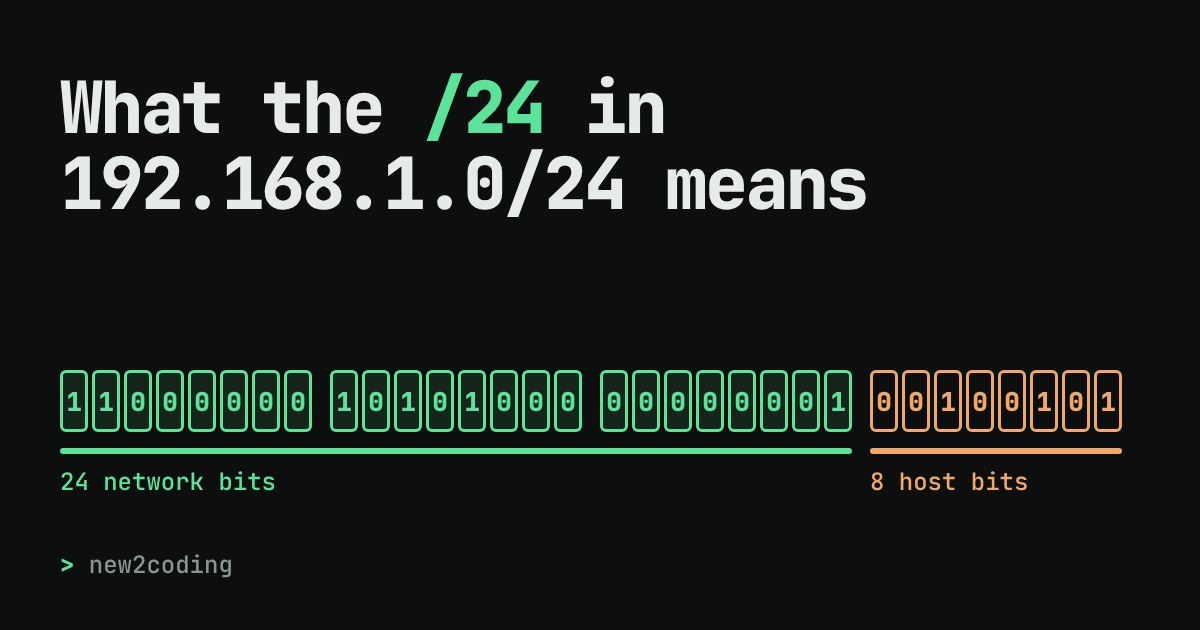
So 192.168.1.37 is really 11000000 10101000 00000001 00100101. Same address, two spellings. Each group of 8 bits is called an octet, because it has eight bits, and it can only hold 0 to 255 (that is why you never see an address like 192.168.1.300).
The slash counts bits
The number after the slash says how many bits, counted from the left, belong to the network part. All devices on the same network share those bits. The bits left over are the host part, which tells devices on that network apart.
In /24, the first 24 bits (the first three octets) are the network, and the last 8 bits are the host. Every address that starts with 192.168.1. is on this network, and the last number picks the device. Try it below: the mint bits are the network part, the orange bits are the host part. Drag the slider to move the boundary, or tap any bit to flip it and watch the address change.
What the numbers in the table mean
The netmask is the same split written as an address: network bits are 1, host bits are 0. For /24 that is 24 ones followed by 8 zeros, which is 255.255.255.0. Older tools and home routers show this form instead of the slash.
The network address is what you get when you set every host bit to 0. It names the whole network rather than one device. The last address (set every host bit to 1) is traditionally the broadcast address, used to talk to every device on the network at once.
That is why the usable count is smaller than the block size. A /24 has 8 host bits, so 28 = 256 addresses, but two are reserved: 256 − 2 = 254 devices. Slide to /30 and you get 4 addresses and 2 usable, which is enough for a link between two routers. The tiny blocks /31 and /32 are special cases: a /31 has two usable addresses for point-to-point links (RFC 3021), and a /32 is a single address.
Every bit you add to the prefix cuts the block in half. /24 is 256 addresses, /25 is 128, /26 is 64. Going the other way, /16 is 65,536 addresses and /8 is 16,777,216.
Checking the maths with Python
Python's standard library has an ipaddress module that does exactly this. Here it is on our example:
import ipaddress

net = ipaddress.ip_network("192.168.1.0/24")
print(net.netmask)            # the mask as dotted numbers
print(net.num_addresses)      # every address in the block
print(net.network_address)    # first address
print(net.broadcast_address)  # last address
hosts = list(net.hosts())     # addresses a device can use
print(len(hosts), hosts[0], hosts[-1])
Output:
255.255.255.0
256
192.168.1.0
192.168.1.255
254 192.168.1.1 192.168.1.254
It matches the table above. And the "same network?" question from the widget is one line:
import ipaddress

net = ipaddress.ip_network("192.168.1.0/24")
print(ipaddress.ip_address("192.168.1.200") in net)
print(ipaddress.ip_address("192.168.2.5") in net)
Output:
True
False
Why it matters
When your computer wants to send something to another address, it first asks: is that address inside my own network? Under the hood it applies the netmask to both addresses and compares the network parts. If they match, the device is nearby and the data goes straight to it. If they do not, the data is handed to the gateway (usually your router), which passes it further along. So a wrong prefix can make a device that is sitting next to you look "far away", which is a classic reason why two machines at home cannot see each other.
You will also meet CIDR whenever you set up cloud networks and firewalls. A rule that allows 10.0.0.0/8 lets in about 16.7 million addresses, while 203.0.113.7/32 lets in exactly one. Three blocks are reserved for private networks that are not reachable directly from the public internet, and your home network almost certainly sits in one of them: 10.0.0.0/8, 172.16.0.0/12 and 192.168.0.0/16 (defined in RFC 1918).
Everything here is about IPv4. Its newer sibling IPv6 uses 128-bit addresses and the same slash idea, so what you learned carries over: /64 means the first 64 bits are the network.