networks/nat-how-a-dozen-devices-share-one-internet-address.md
NAT: how a dozen devices share one internet address
Your home has one public internet address but a dozen devices. NAT is how your router lets them all share it and still get each reply to the right device.
A walk through the translation table a router keeps, with a small Python router you can read in one go, and why a server on your laptop can't be reached from outside.
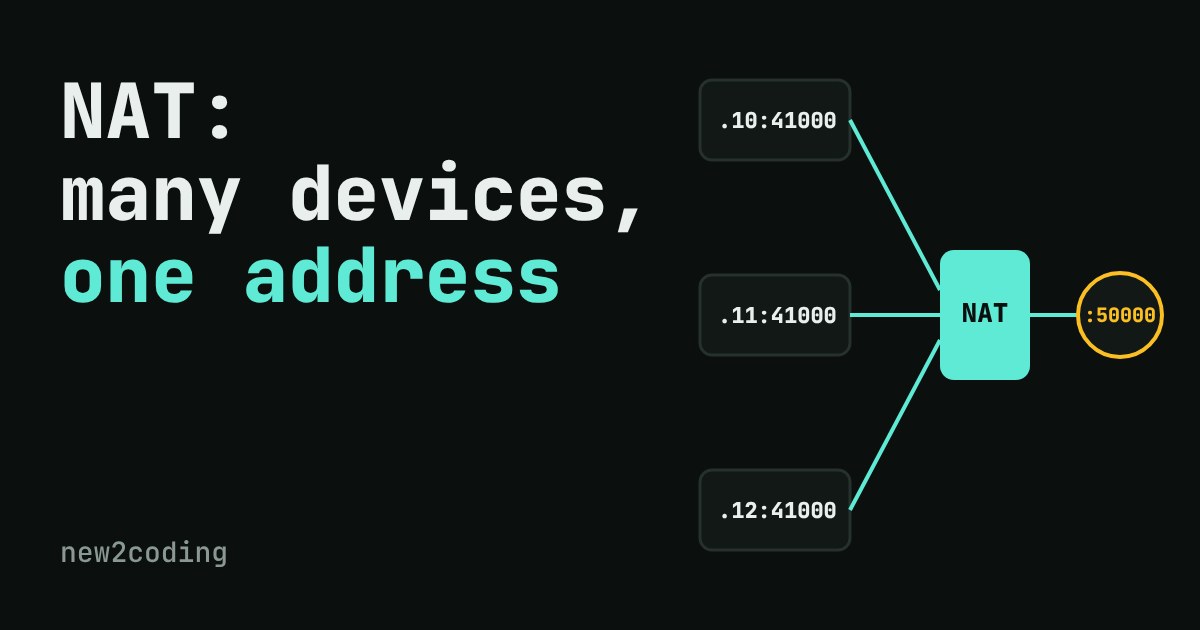
Count the devices in your home that use the internet: a phone, a laptop, maybe a TV, a games console, a smart speaker. The internet knows your home by a single address. So how does a reply from a website find the right device? The trick is called NAT, short for Network Address Translation, and your home router does it all day without you noticing.
The problem: not enough addresses
An IP address is the number that identifies a device on a network, like 93.184.216.34. The older and still dominant version, IPv4, uses 32 bits, which allows 232 = 4,294,967,296 addresses. That sounds like a lot, but there are more internet-connected devices than that, so giving every one of them its own public address was never going to work.
The fix: reserve some address ranges for private use. Anyone can use them inside their own network, and they are never used on the public internet. The three ranges, set out in a standard called RFC 1918, are 10.0.0.0/8, 172.16.0.0/12 and 192.168.0.0/16. If your laptop's address starts with 192.168, it is private, and so are your neighbours' laptops, which have the very same numbers. (The /24-style endings are explained in the CIDR article on this site.)
A private address can't be used on the internet, because millions of homes would all claim to be 192.168.1.10. Something has to swap it for an address that is unique. That something is the router.
What the router does
Your router has one public address, given to it by your internet provider. When a device inside sends a message out, the router rewrites the "from" part: it replaces the device's private address and port with its own public address and a port it picks. Then it writes down what it did in a translation table. When the reply comes back addressed to that public port, the router looks it up, rewrites the "to" part back to the device's private address, and passes it in.
Ports matter here. A port is a number that tells a computer which program should get a message (the earlier article on IP addresses and ports covers it). Two devices can both use port 41000 locally. The router gives them different public ports, such as 50000 and 50001, and that difference is how it tells the replies apart.
Try it: be the router
The same idea in code
Here is a toy router in Python. It is the whole mechanism: a dictionary going out and a dictionary coming back.
PUBLIC_IP = "203.0.113.7"

class Router:
    def __init__(self):
        self.next_port = 50000
        self.table = {}   # (private_ip, private_port, dest) -> public_port
        self.back = {}    # public_port -> (private_ip, private_port)

    def outbound(self, src_ip, src_port, dest):
        key = (src_ip, src_port, dest)
        if key not in self.table:
            self.table[key] = self.next_port
            self.back[self.next_port] = (src_ip, src_port)
            self.next_port += 1
        return (PUBLIC_IP, self.table[key], dest)

    def inbound(self, public_port):
        if public_port in self.back:
            return self.back[public_port]
        return None   # nobody asked for this: drop it

r = Router()
print(r.outbound("192.168.1.10", 41000, "93.184.216.34:443"))
print(r.outbound("192.168.1.11", 41000, "93.184.216.34:443"))
print(r.inbound(50001))
print(r.inbound(50777))
Running it prints:
('203.0.113.7', 50000, '93.184.216.34:443')
('203.0.113.7', 50001, '93.184.216.34:443')
('192.168.1.11', 41000)
None
Both devices used local port 41000, yet they came out as ports 50000 and 50001. A real router also deletes rows that go quiet for a while, otherwise the table would grow forever. And ports run out too: there are 65,535 of them per address, which is plenty for a household.
Why this matters for your own code
Outgoing is easy, incoming is hard. Your laptop can start a conversation with any website, because the router creates a row when the request leaves. But if you run a small web server on your laptop, a friend on the internet can't reach it: their packet arrives at your public address with no matching row, and the router drops it. This is why a program that works at localhost:3000 can't be opened from outside without extra steps.
Those extra steps are usually port forwarding, a permanent row that you add by hand ("anything arriving at public port 8080 goes to 192.168.1.10:3000"), or a tunnelling or hosting service that does the reaching in for you.
NAT is not a security guarantee. Dropping unrequested packets happens to block many unwanted visitors, but that is a side effect of bookkeeping. A firewall is a separate feature with deliberate rules.
One address can be shared even wider. Some internet providers run NAT again on their own side, called carrier-grade NAT, so many homes share one public address. If you see a router address starting with 100.64 to 100.127, that is the range set aside for it. Port forwarding can't work there, because you don't control the outer router.
IPv6 changes the picture. IPv6 addresses are 128 bits long, so every device can have its own public address and NAT is not needed for address supply. As of 2026 both IPv4 and IPv6 are in everyday use side by side, so you will meet NAT for years to come.
The short version
Inside your home, devices use private addresses that many other homes also use. Your router has one public address and swaps each outgoing message's "from" details for its own, noting the swap in a table. Replies are matched against the table and sent to the right device. A message nobody asked for matches nothing, so it is dropped.