web/cors-why-a-browser-blocks-a-request-your-server-happily-answered.md
CORS: why a browser blocks a request your server happily answered
You call your own API from a web page and the browser says blocked by CORS policy, even though the address works in a new tab. The server is not broken: the browser is protecting the person using it.
This article starts from one rule, the same origin (scheme, host and port), and shows how a server opts in with an Access-Control-Allow-Origin header. You then play with a simulator: choose where the page lives, what it asks for and how the server is set up, and watch the browser decide, including preflight requests and cookies.
The error that says your server did nothing wrong
You write a page, call your own API with fetch, and the browser console answers: "blocked by CORS policy". Yet if you open the API address in a new tab, it works. The server is fine. So who blocked what?
The short answer: the browser did, on purpose, to protect the person using it. This article builds up the idea from one rule and lets you break it yourself.
Start with the origin
An origin is three things glued together: the scheme (https), the host (app.example.com) and the port (443 unless written). Two addresses are the same origin only if all three match. The path does not count.
| Page | Calls | Same? |
|---|---|---|
https://app.example.com/a | https://app.example.com/b | yes (path ignored) |
https://app.example.com | http://app.example.com | no (scheme) |
https://app.example.com | https://api.example.com | no (host) |
https://app.example.com | https://app.example.com:8443 | no (port) |
By default, JavaScript on one origin may send requests elsewhere but may not read the answers from another origin. Without that rule, any website you visit could quietly read your webmail in another tab, using your logged-in cookies.
CORS: the server opts in
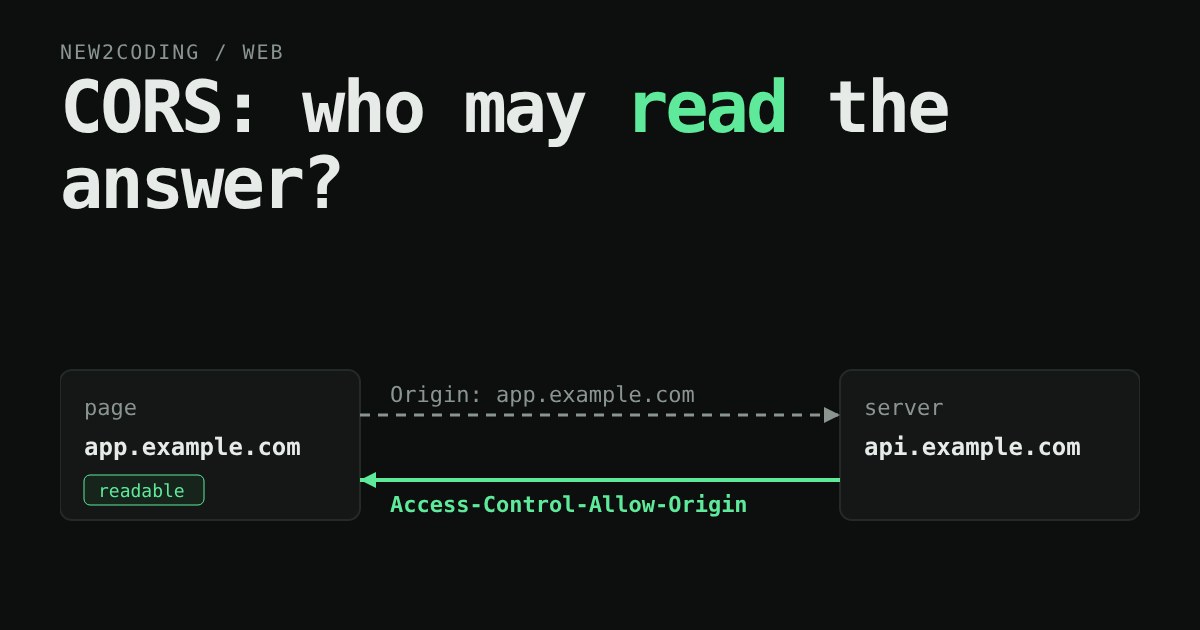
CORS (Cross-Origin Resource Sharing) is the way a server says "yes, that other origin may read my answers". The conversation is made of ordinary HTTP headers:
- The browser adds
Origin: https://app.example.comto the request. - The server may reply with
Access-Control-Allow-Origin: https://app.example.com. - The browser compares. If the header matches the page's origin (or is
*), your JavaScript gets the response. If not, it gets an error and nothing else.
Here is a tiny Node server that allows exactly one origin. This is the real output from running it and asking with curl, which pretends to be a page by sending an Origin header:
const http = require("http");
const ALLOWED = ["https://app.example.com"];

http.createServer((req, res) => {
  const origin = req.headers.origin;
  if (ALLOWED.includes(origin)) {
    res.setHeader("Access-Control-Allow-Origin", origin);
    res.setHeader("Vary", "Origin");
  }
  if (req.method === "OPTIONS") {           // the preflight question
    res.setHeader("Access-Control-Allow-Methods", "GET, POST, DELETE");
    res.setHeader("Access-Control-Allow-Headers", "Content-Type");
    res.writeHead(204);
    return res.end();
  }
  res.setHeader("Content-Type", "application/json");
  res.end(JSON.stringify({ hello: "from the API" }));
}).listen(3000);
Origin: https://app.example.com -> HTTP/1.1 200 OK
Access-Control-Allow-Origin: https://app.example.com
Vary: Origin
Origin: https://evil.example -> HTTP/1.1 200 OK
(no Access-Control-Allow-Origin header)Look at the second case: the server still answered 200 OK. It did the work and sent the data. The only thing missing is a header, and the browser uses that absence to hide the data from the page. curl, Postman and other servers ignore CORS completely, because it is a browser rule.
Try it: the browser's decision, step by step
Pick where the page lives, what it asks for, and how the server is set up. Then press Send and read what the browser decides.
Why some requests ask permission first
Notice that the DELETE and the JSON POST triggered an extra question. This is the preflight: before sending anything that could change data in unusual ways, the browser sends an OPTIONS request asking "would you accept this?". Only if the server's answer allows it does the real request go out.
A request skips the preflight when it is "simple": the method is GET, HEAD or POST, only a few ordinary headers are set, and the Content-Type is one that an old-fashioned HTML form could already send (application/x-www-form-urlencoded, multipart/form-data or text/plain). Plain forms could always post to other sites, so those requests are sent without a prior question. That is why the lab shows a blocked simple POST that the server still handled.
The preflight answer can be remembered with Access-Control-Max-Age (seconds), so the browser does not ask before every call. Browsers cap that number, and MDN lists 5 seconds as the default if you send none.
Cookies make it stricter
When a page asks the browser to include cookies (fetch(url, { credentials: "include" })), two extra rules apply. The server must send Access-Control-Allow-Credentials: true, and Access-Control-Allow-Origin must name the exact origin: * is refused. The reason is plain: "any site may read this person's logged-in data" is exactly what the original rule exists to stop.
What this means for your own code
When you see the error, the fix lives on the server, not in your page. Check the console message: it names the missing header. Then add an allow-list of origins you actually trust, as the sample does, rather than echoing back whatever Origin arrives. If you pick the origin from a list, also send Vary: Origin so a shared cache does not hand one origin's answer to another.
Two habits will save you hours. First, a CORS error is not proof the server is broken; look at whether the request reached it. Second, never treat CORS as the lock on your API: it only controls what other websites can read in a browser. Anyone with curl can still call your server, so authentication and permission checks still belong on the server.