web/the-dom-how-a-browser-turns-html-text-into-a-tree.md
The DOM: how a browser turns HTML text into a tree
A web page starts as plain text, yet a script can add a bullet to it while it is open. How? The browser never works on your text directly. It parses the HTML once and builds a tree of objects called the DOM.
Step through a tiny parser, edit the HTML yourself and watch the tree grow. Then see why a forgotten closing tag does not break a page, why whitespace counts as a node, and how `childNodes` and `children` give different answers (real results from headless Chromium).
You write a few lines of HTML: a heading, a list, a button. You save the file, open it, and a page appears. Then a script on that page says list.append(newItem) and a new bullet shows up, without anyone reloading anything. How can a block of text be changed while it is running?
It cannot. The browser does not keep your HTML text around as the thing it works on. It reads the text once and builds something else from it: a tree of objects called the DOM. Everything a script does to a page, it does to that tree.
Text in, tree out
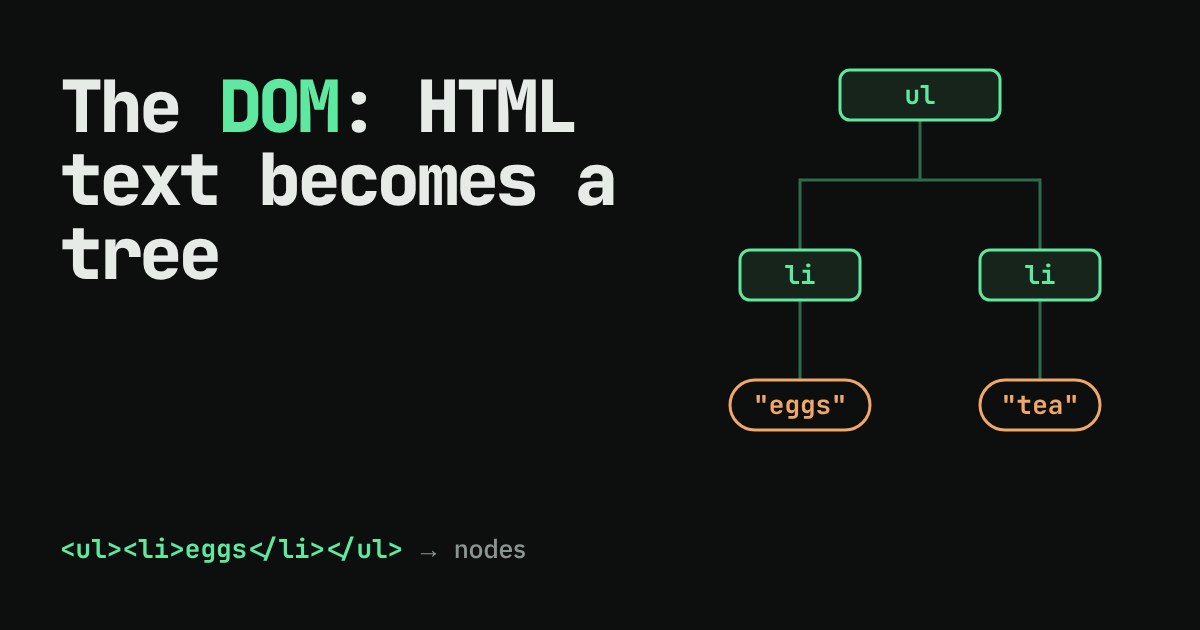
HTML is just text with tags in it. A tag such as <ul> marks where something starts, and </ul> marks where it ends. The browser's first job is to turn that flat text into a structure that shows what sits inside what. That job is called parsing.
The result is the DOM (Document Object Model): a tree in which every piece of the page is a node. A node can have one parent and any number of children, exactly like folders on your computer. Two kinds of node matter at first:
- An element node for every tag pair, such as
ulorli. - A text node for every run of plain text, such as the word
eggsinside anli.
Notice that the word eggs is not part of the li element itself. It is a separate child node that lives inside it.
Watch the parser build it
Parsers read left to right and keep a stack of the elements that are currently open. Reading a start tag creates a child of whatever is on top of the stack, then puts the new element on the stack. Reading an end tag takes the top element off. Reading text adds a text node to the top element. That is nearly the whole idea.
Below is a small version of that process. Step through it, then edit the HTML yourself and watch the tree change.
Try the third example, where the closing tags for the first li are missing. Our little parser keeps the second li inside the first one. Real browsers have extra rules for list items and paragraphs, and they would place the second li next to the first. The lesson is the same either way: the browser always produces a tree, however messy your text is.
Why a forgotten tag does not crash the page
Most programming languages stop with a syntax error when you write something invalid. HTML does not. The HTML specification describes, step by step, what a browser must do with broken markup, so every browser repairs it the same way. You can see it yourself. Feeding Chromium the text <p>one<p>two gives this tree, written back out as HTML:
<p>one</p><p>two</p>Two separate paragraphs, both properly closed, from text that never closed either one. The tree is what the browser trusts. The text you wrote is only the starting point, and what you see in the browser's "Elements" panel is the repaired tree, not your file.
Whitespace is a node too
Here is a detail that surprises almost everyone. Take this list, written the way people normally format it:
<ul>
  <li>eggs</li>
  <li>tea</li>
</ul>
How many children does the ul have? Two, you would say. In a real browser, asking for all child nodes returns five: a text node of line break and spaces, the first li, another whitespace text node, the second li, and a final whitespace text node. Our demo hid those blank pieces to stay readable, but the browser keeps them. That is why JavaScript gives you two different questions to ask:
const ul = document.querySelector("ul");
ul.childNodes.length;  // 5  (3 whitespace text nodes + 2 li elements)
ul.children.length;    // 2  (elements only)
I ran exactly this in headless Chromium and got 5 and 2. When a beginner's loop over childNodes hits a strange blank entry, this is the reason. Use children when you only care about elements.
Changing the tree changes the page
Now the opening question has an answer. A script never edits your HTML text. It edits the tree, and the browser redraws whatever the tree describes:
const li = document.createElement("li");  // make a new element node
li.textContent = "milk";                  // give it a text node inside
ul.append(li);                            // attach it as the last child

ul.children.length;      // 3  (it was 2)
ul.lastElementChild.textContent;  // "milk"
Both outputs are real results from the same test page. The new bullet appears because the tree gained a node, not because anyone rewrote the file. Reload the page and it is gone, because the file on the server still says two items.
What to take away
When your page looks wrong, remember there are two things to check: the text you wrote, and the tree the browser built from it. The browser's developer tools (usually opened with F12) show you the tree. If the tree differs from what you intended, a missing or misplaced tag is usually the cause. And when you write JavaScript for a page, you are always asking one question: which node do I want, and what do I want to do to it?