languages/javascript-closures-how-a-function-remembers-a-variable-after-the-func.md
JavaScript closures: how a function remembers a variable after the function that made it has finished
A function in JavaScript can still use a variable long after the function that created it has finished. That is called a closure, and you have already written dozens of them.
Press a button to make counters with the real `makeCounter()` code, and watch each one keep its own hidden `count` box. Then see why three timers in a `var` loop all print 3 while the `let` version prints 0, 1, 2. Every code sample was run, and the output shown is the real output.
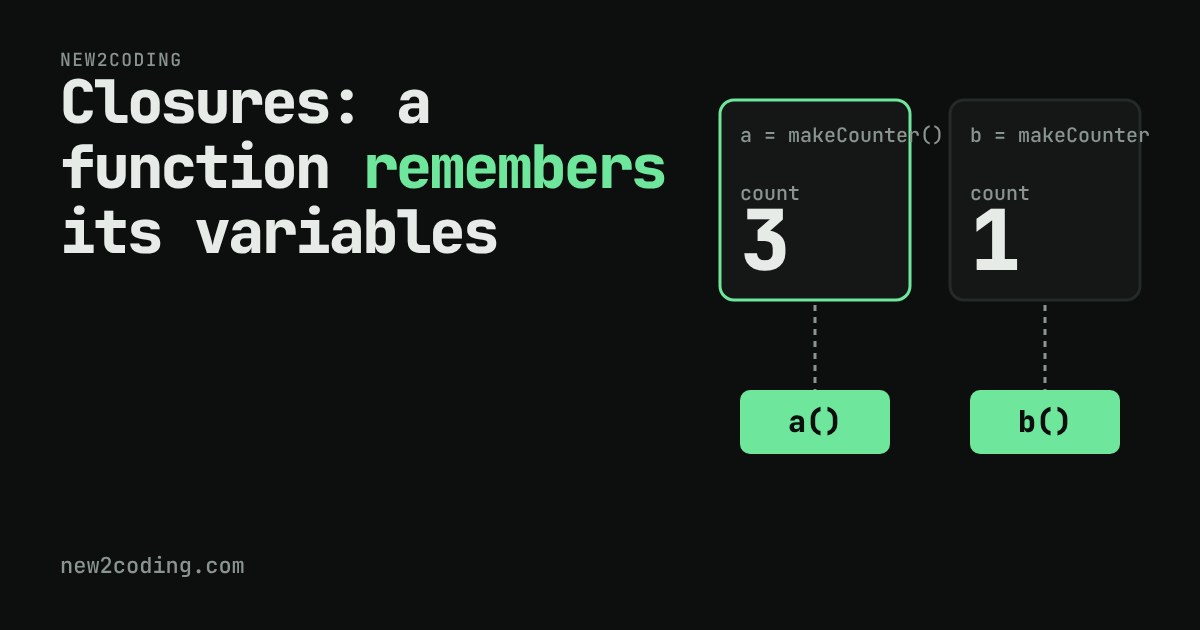
Look at this small function. It makes a counter, and the counter remembers how many times you have called it:
function makeCounter() {
  let count = 0;
  return function () {
    count = count + 1;
    return count;
  };
}

const a = makeCounter();
console.log(a(), a(), a());   // 1 2 3
That output is real, from Node 22. But there is something odd here. count is a local variable: a variable that belongs to one call of makeCounter. When a function finishes, its local variables are normally thrown away. makeCounter finished the moment it returned. So how can a() still add to count afterwards?
The answer: a function carries its surroundings
In JavaScript, when you create a function inside another function, the new function keeps a hidden link to the variables that were in scope where it was written. The word scope just means "the places in the code where a name can be used". The inner function can see count because count is in the scope around it.
That function plus its link to the surrounding variables is called a closure. You never write the word closure in your code. Every function you create inside another function is one.
The important detail: the link is to the variable itself, not to a copy of its value at that moment. As long as something can still call the inner function, JavaScript keeps count alive. When nothing can reach the function any more, the variable can be cleaned up with it.
Try it: every call to makeCounter gets its own box
Below, each press of the first button runs the real makeCounter() and gives you a new counter. Each counter owns one count box. Call the counters in any order and watch which box changes.
Make two counters, call a() three times, then call b() once. You get 1 for b, because b has its own count. Then call a() again and it says 4. Here is the same thing in plain code:
const a = makeCounter();
const b = makeCounter();
console.log(a(), a(), a());   // 1 2 3
console.log(b());             // 1
console.log(a());             // 4
A useful trick: private variables
Because only the inner functions can reach count, nothing outside can change it by accident. That gives you a way to hide data in JavaScript:
function makeWallet(start) {
  let balance = start;
  return {
    add(n) { balance += n; return balance; },
    show() { return balance; }
  };
}

const w = makeWallet(10);
w.add(5);
console.log(w.show(), w.balance);   // 15 undefined
The wallet object has two functions, and both share the one balance variable. Reading w.balance gives undefined, because balance is not a property of the object. It only lives in the closure.
The famous surprise: timers in a loop
Because a closure links to the variable and not to a copy of its value, you can get a result that confuses almost every beginner. This loop schedules three tiny timers (setTimeout with 0 means "run this function after the current code has finished"):
for (var i = 0; i < 3; i++) {
  setTimeout(function () { console.log("var", i); }, 0);
}
for (let j = 0; j < 3; j++) {
  setTimeout(function () { console.log("let", j); }, 0);
}
Real output from Node 22:
var 3
var 3
var 3
let 0
let 1
let 2
With var, there is one single i for the whole loop. The three timer functions all link to that same variable. By the time the timers run, the loop has finished and i is 3, so all three print 3.
With let, JavaScript makes a fresh variable for every pass of the loop, as the language specification defines it. Each timer function links to its own j, which still holds 0, 1 or 2. Same idea as the counters above: separate boxes, separate values.
Before let existed (it arrived in 2015), people fixed the var loop by calling a small function on every pass, so each call got its own variable:
for (var i = 0; i < 3; i++) {
  (function (copy) {
    setTimeout(function () { console.log("fixed", copy); }, 0);
  })(i);
}
// fixed 0, fixed 1, fixed 2
You may meet this pattern in older code. In new code, let does the job.
What to take away
A function remembers the variables around the place where it was written, and it keeps them alive for as long as it can still be called. Every call of the outer function creates a fresh set of those variables. The link is to the variable itself, so if the variable changes, the function sees the change.
When something in your code remembers a value you did not expect, ask: which function created this variable, and which functions still hold a link to it? Two counters that each have their own count and three timers that share one i are the same mechanism, seen with different boxes.