languages/javascript-s-event-loop-why-settimeout-0-runs-after-the-code-below-it.md
JavaScript's event loop: why setTimeout(…, 0) runs after the code below it
Why does `setTimeout(fn, 0)` run after the lines below it, and why does a promise callback beat it? JavaScript has one worker and two waiting lines, and the event loop is the fixed rule for who goes next.
Step through a four-line program one move at a time, watch the call stack and both queues change, then predict a longer example by hand. Every output shown was produced by running the code in Node 22.
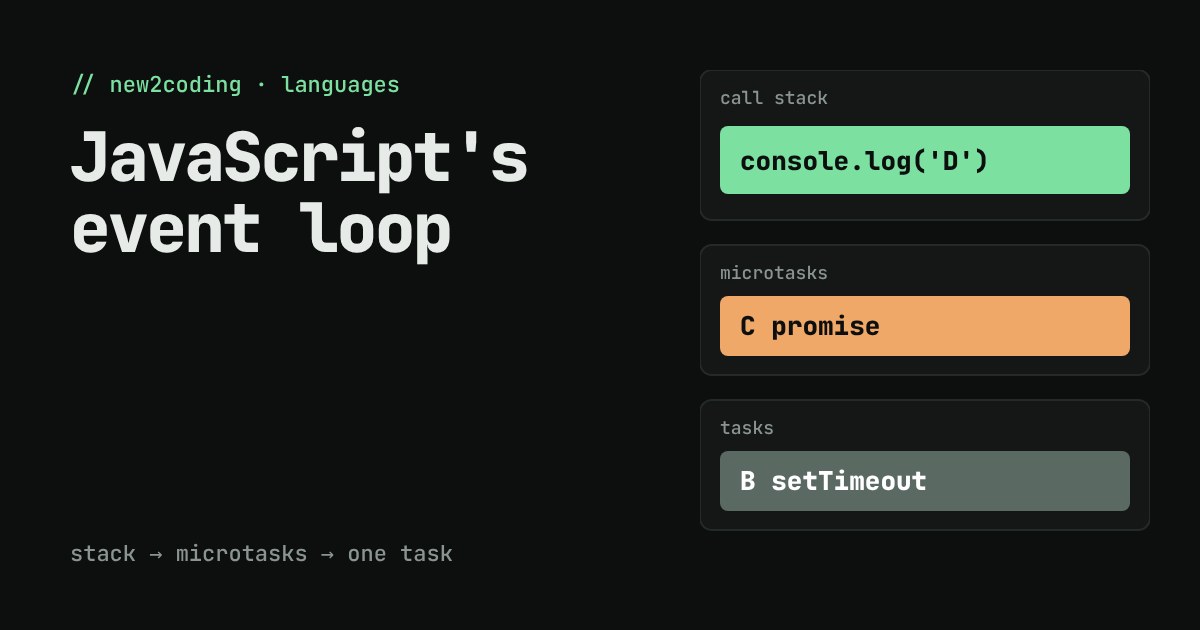
Why does the line below run first?
Here is a four-line JavaScript program. Read it top to bottom and guess what it prints.
console.log('A');
setTimeout(() => console.log('B'), 0);
Promise.resolve().then(() => console.log('C'));
console.log('D');
Most beginners guess A B C D, because the lines are in that order and the timer says 0 milliseconds. Run it in Node 22 and you get this instead:
A
D
C
B
Nothing is broken. JavaScript has a fixed rule for when each kind of code is allowed to run, and the rule has a name: the event loop. By the end of this page you will be able to predict that output, and any program like it, by hand.
One worker, one thing at a time
JavaScript runs your code on a single thread. A thread is one line of execution, like one cook in a kitchen who can only do one task at once. While the cook is chopping, nobody else is stirring.
The place where that cook keeps track of what is running right now is called the call stack. When a function is called, it goes on top of the stack; when it returns, it comes off. The cook only ever works on whatever is on top, and only starts something new when the stack is empty.
That raises a question. If there is only one cook, how can a page wait for a timer, a click or a download without freezing? The answer is that waiting is not done by your JavaScript. Timers and network requests are handled by the environment around it (the browser, or Node), and when something is ready, the environment leaves a note saying "run this function when you are free". Those notes wait in queues.
Two waiting lines, and who goes first
There are two queues that matter here.
The task queue holds callbacks from things like setTimeout, clicks and incoming messages. The microtask queue holds the callbacks of promises (the function you pass to .then()). Both are first-in, first-out lines.
The event loop is the rule for taking from them, and it fits in four sentences:
- Run the current script (or task) until the call stack is empty.
- Now run every microtask, including any new ones that get added while draining, until the microtask queue is empty.
- Take the one oldest task from the task queue and run it. Go back to step 2 when it finishes.
- If both queues are empty, wait for something new.
So promise callbacks always cut in line ahead of timer callbacks, and the timer callback only gets its turn once the script and all microtasks are done. That is the whole answer to the puzzle. Step through it yourself below.
A longer example you can predict
Try this one on paper before you read the answer. Two timers, one promise chain.
console.log('start');
setTimeout(() => console.log('timeout 1'), 0);
setTimeout(() => console.log('timeout 2'), 0);
Promise.resolve().then(() => console.log('promise 1'))
  .then(() => console.log('promise 2'));
console.log('end');
The script prints start and end. Then the microtasks drain. promise 1 runs, and finishing it adds promise 2 to the same queue, which also drains before any task is touched. Only then do the two timers run, in the order they were created. Real output from Node 22:
start
end
promise 1
promise 2
timeout 1
timeout 2
What "0 ms" really means
The number in setTimeout(fn, 0) is a minimum wait, not a promise. The callback cannot start until the call stack is empty, so a busy script delays every timer. Here is a loop that keeps the cook busy for 100 milliseconds:
const t = Date.now();
setTimeout(() => console.log('timer ran after', Date.now() - t, 'ms'), 0);
while (Date.now() - t < 100) {}  // nothing else can run
console.log('loop done');
loop done
timer ran after 102 msThe timer asked for 0 ms and waited about 100, because the loop held the stack the whole time (the exact number varies a little from run to run). In a web page, that same stall means the page cannot respond to clicks or redraw, because those also need the stack to be free. This is what people mean by "blocking the main thread".
So what, for your own code?
Three habits follow from the rule.
First, do not use setTimeout(fn, 0) to mean "run this right now, later". It means "run this after the current script and all promise callbacks". If you need the order to be exact, put the dependent code inside a .then() or after an await instead of relying on timer timing.
Second, keep each task short. Long loops, huge JSON parsing and big calculations freeze everything else on the page. Split the work into pieces, or move it to a Web Worker (a separate thread the browser lets you start for heavy work).
Third, remember that await is promise machinery. The code after an await runs as a microtask once the awaited promise is ready, so it also jumps ahead of waiting timers. That is why mixed async code and timers sometimes print in an order that surprises people, and why drawing the two queues on paper is the fastest way to debug it.
The rule is the same in the browser and in Node for these examples: finish the stack, drain the microtasks, take one task, repeat. (Node has a few extra queue types of its own, such as process.nextTick, which are worth learning once this basic picture feels natural.)