languages/ruby-strings-why-changing-b-also-changes-a.md
Ruby strings: why changing b also changes a
In Ruby, `b = a` does not copy a string: it puts a second label on the same object. So `b << "s"` changes `a` too, while `b += "s"` does not.
Step through three tiny programs, watch the labels and objects move, and learn when to use `.dup` or `.freeze` so a method can't change your data by surprise.
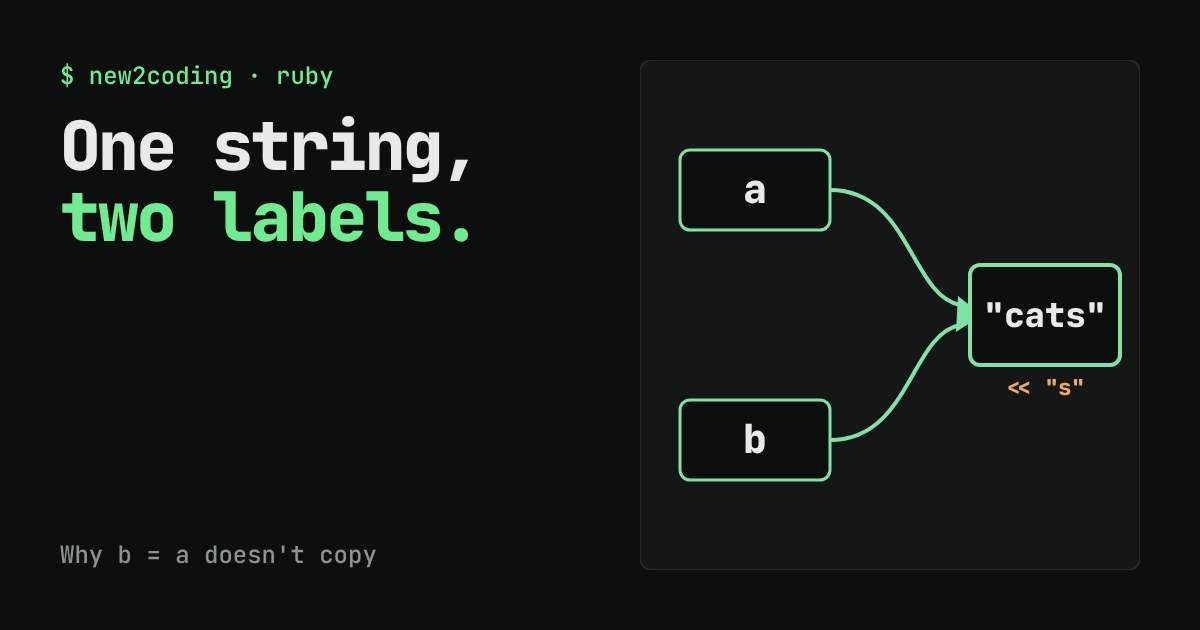
You write b = a, change b, and somehow a changes too. In Ruby this surprises almost everyone the first time. The cause is a small idea about what a variable really is, and once you see it, a whole family of confusing bugs becomes easy to predict.
A variable is a label, not a box
It is tempting to picture a variable as a box that holds a value. In Ruby, a variable is closer to a sticky label that points at a value stored somewhere else. The value itself, such as the text "cat", is called an object, and every object has an identity: a number Ruby uses to tell objects apart.
a = "cat"
b = a
puts a.equal?(b)   # true
The method equal? asks "are these the very same object?". Line 2, b = a, does not copy the text. It sticks a second label on the object that a already points to. One object, two labels.
Two ways to "change" a string
Strings in Ruby are mutable, which means an existing string object can be edited in place. The operator << does exactly that: it adds text to the end of the object itself. Compare it with +=:
a = "cat"
b = a
b << "s"
puts a    # cats

x = "cat"
y = x
y += "s"
puts x    # cat
puts y    # cats
I ran this with Ruby 3.3.6 and these are the real outputs. The difference comes from what each line means:
b << "s"edits the object. Every label on that object sees the change.y += "s"is shorthand fory = y + "s". The+builds a new string, and then the labelymoves to it. The old object, still labelledx, is untouched.
Try it: watch the labels move
In the first example both labels end up on a single object, so an edit through one is visible through the other. In the second, += peels b off and sends it to a new object. In the third, .dup makes a real copy up front.
Why this shows up inside methods
When you pass a string to a method, Ruby hands the method another label for the same object. That means a method can change the string you passed in:
def shout(w)
  w << "!"
end
name = "hi"
shout(name)
puts name    # hi!

def shout2(w)
  w = w + "!"
end
n2 = "hi"
shout2(n2)
puts n2      # hi
Again these are real outputs. shout edits the shared object, so the caller sees hi!. shout2 only moves its own local label to a new string, so the caller's string is unchanged. Neither is wrong; the point is to know which one you wrote. Many Ruby methods that edit in place end in ! (such as upcase!) as a hint, but the name is a convention, not a guarantee.
Numbers and symbols behave differently
n = 5
m = n
m += 1
puts n    # 5
puts m    # 6
Numbers can never be edited in place, so m += 1 always moves the label to a different number. Nothing can surprise you. The same is true of symbols such as :cat: there is only ever one :cat object, so :cat.equal?(:cat) is true, while "cat".equal?("cat") is false because each literal makes its own string object.
Three ways to stay safe
Copy when you mean a copy. Use .dup (or +=) before editing a string you received from somewhere else.
Freeze what should not change. A frozen object refuses edits:
s = "cat".freeze
s << "s"
# FrozenError: can't modify frozen String: "cat"
Putting the comment # frozen_string_literal: true at the top of a file freezes every plain string literal in that file, which is a common habit in Ruby projects. Note that .dup and += both give you an unfrozen string to work with.
Ask Ruby when unsure. a.equal?(b) tells you whether two labels share one object, and a.object_id shows the identity number.
The one idea to keep
Assignment moves labels; it does not copy objects. Whenever an editing method such as << runs, ask: which other labels point at this same object? If the answer is "someone else's", copy first.