security/password-strength-why-length-beats-a-capital-letter-and-a-symbol.md
Password strength: why length beats a capital letter and a symbol
Everyone says passwords need a capital, a number and a symbol, and also that they should be long. Which one actually matters more? The answer is arithmetic: the number of possible passwords is pool size ^ length, so length is an exponent and wins.
Type a pattern or slide a word count in the interactive and watch combinations, bits and guessing time change. You will also see why Password1! still falls at once: the maths only holds when the password is truly random.
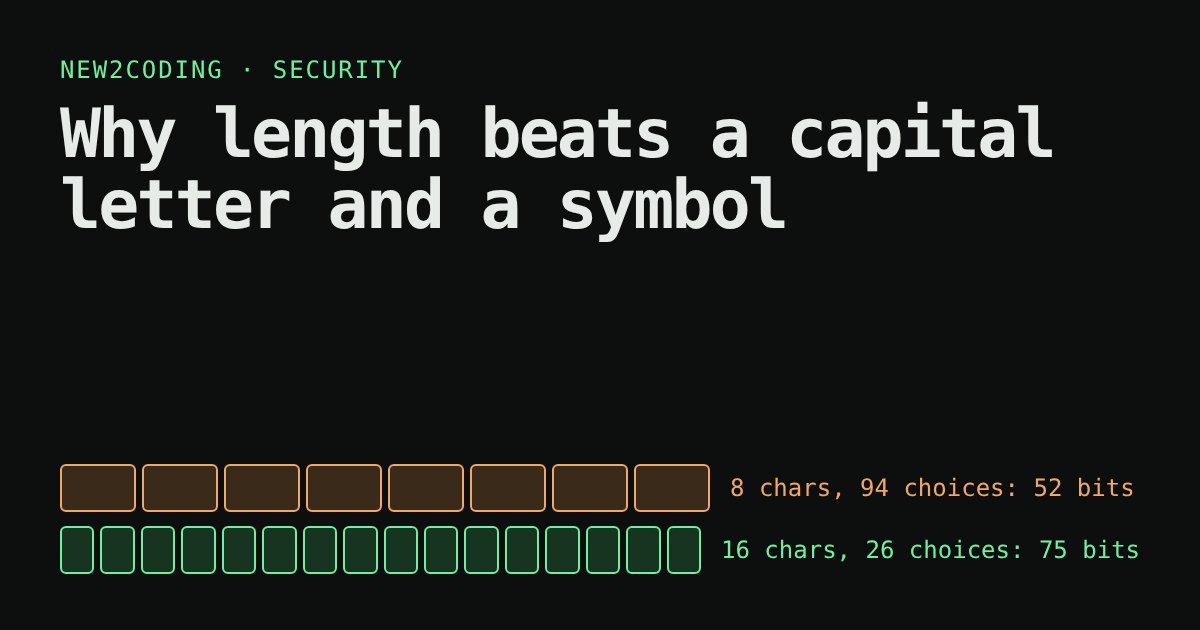
You have probably been told to add a capital letter, a number and a symbol to your password. You have probably also been told to make it long. Which one matters more? A little arithmetic answers it, and you can try the arithmetic yourself below.
How an attacker "guesses"
A password is a secret string that proves you are you. If an attacker has no other way in, the only move left is to guess: try one candidate after another until one works. The more candidates there are, the longer that takes.
Suppose a password is picked completely at random, one character at a time, from a pool of possible characters. Then the number of possible passwords is simple to work out:
combinations = pool size ^ length
Read ^ as "to the power of": multiply the pool size by itself length times. A pool of 26 lowercase letters and a length of 8 gives 26 × 26 × … (eight times) = 208,827,064,576 combinations, about 209 billion. That sounds like a lot, but computers count fast.
Bits: a way to compare sizes
Those numbers get unwieldy, so people measure them in bits. One bit is one coin flip. Every extra bit doubles the number of combinations, so 38 bits means about 238 guesses in the worst case. The bit count is just log2(combinations): how many times you can double 1 to reach that number.
Adding one more character to a 26-letter password multiplies the combinations by 26, which adds about 4.7 bits. Widening the pool from 26 to 94 (lowercase, uppercase, digits and symbols you can type on a US keyboard) multiplies the pool by 3.6 but, for an 8-character password, adds only about 14.8 bits in total. Length wins because it is an exponent; pool size is only the base.
Try it
Two things to try. First, compare "8 mixed" with "16 lowercase": the sixteen plain letters are astronomically harder to guess than eight characters from the full keyboard. Second, switch to Random words and slide from 4 to 6 words: each word adds about 12.9 bits.
Where "10 billion per second" comes from
The speed depends on how the attacker guesses. When they must go through the website's login page, the site can slow them down and lock the account, so the realistic rate is tiny. The scary case is an offline attack: a company's database leaks, and the attacker has the stored hashes (scrambled fingerprints of passwords; see the password-hashing article on this site). Now they can guess on their own hardware with no one to stop them. How fast depends on the hash: a fast, old-style hash can be tried billions of times a second on strong graphics hardware, while a deliberately slow one (such as bcrypt, scrypt or Argon2) cuts that dramatically. The 10 billion figure in the tool is an assumption for the bad case, not a measurement of any particular system. Treat the times as a way to compare passwords with each other, not as promises.
Check it with code
Here is the same arithmetic in Python, with the attacker guessing 10 billion times a second and finding the answer on average halfway through:
import math

def report(name, combos, guesses_per_second=10_000_000_000):
    seconds = combos / 2 / guesses_per_second   # on average you find it halfway
    print(f"{name:<26} {combos:.2e} combos  {math.log2(combos):5.1f} bits  {seconds:.2e} s")

report("8 lowercase letters", 26 ** 8)
report("8 of 94 characters", 94 ** 8)
report("16 lowercase letters", 26 ** 16)
report("4 random words", 7776 ** 4)
report("6 random words", 7776 ** 6)
Running it prints:
8 lowercase letters        2.09e+11 combos   37.6 bits  1.04e+01 s
8 of 94 characters         6.10e+15 combos   52.4 bits  3.05e+05 s
16 lowercase letters       4.36e+22 combos   75.2 bits  2.18e+12 s
4 random words             3.66e+15 combos   51.7 bits  1.83e+05 s
6 random words             2.21e+23 combos   77.5 bits  1.11e+13 s
Under those assumptions, 8 random lowercase letters last about 10 seconds. Eight random characters from the full keyboard last about 3.5 days. Sixteen random lowercase letters last roughly 69,000 years, and six random words roughly 350,000 years. The cheap-looking option with more length beats the fancy-looking one with less.
The catch: "random" is doing the work
All of this assumes every character (or word) was chosen randomly. People are not random. Password1! looks like it has a capital, a digit and a symbol, so by pool size it scores well, yet it is one of the first things an attacker tries, because attackers do not start with aaaaaaaa. They start with lists of passwords that real people have already used, then apply the habits people share: capital letter first, digit and "!" at the end, "a" swapped for "@". Try the Password1! preset: the tool recognises it from a tiny built-in list and tells you it falls at once, however big the pool looks.
That is why the word method works: the computer, a dice roll or a shuffled list picks the words, not your taste. If you choose the four words because they form a nice phrase or relate to your life, the count of 7,7764 no longer applies.
What the official advice says
The US standards body NIST updated its password guidance in 2025 (SP 800-63B, revision 4). For systems where the password is the only thing proving who you are, it requires a minimum length of 15 characters, tells sites not to impose arbitrary composition rules (the "one capital, one symbol" kind), asks them to allow passwords of at least 64 characters, and advises against forced regular changes unless there is evidence of a compromise. In other words, the advice matches the arithmetic: favour length, and stop making people jump through character hoops.
So what should you do?
Use a password manager to generate a long random password (16 characters or more) for every site, so you never have to remember it. For the few you must memorise, such as the manager's own master password, use several words chosen by dice or a generator, not by you. Turn on a second factor wherever it is offered. And if you are building a login form, do not reject long passwords or spaces, and store only a slow salted hash, never the password itself.