computers/floating-point-why-0-1-0-2-is-not-exactly-0-3.md
Floating point: why 0.1 + 0.2 is not exactly 0.3
Type `0.1 + 0.2` into JavaScript or Python and you get `0.30000000000000004`. It is not a bug, and it is not your mistake.
Computers store numbers in binary, and a tenth is a fraction that never ends in binary, just like one third never ends in decimal. Flip the real 64 bits of a number yourself, see the exact value the computer keeps, and watch the stray `4` appear. Then learn what to do in your own code: compare with a tolerance, count money in whole cents, and round only for display.
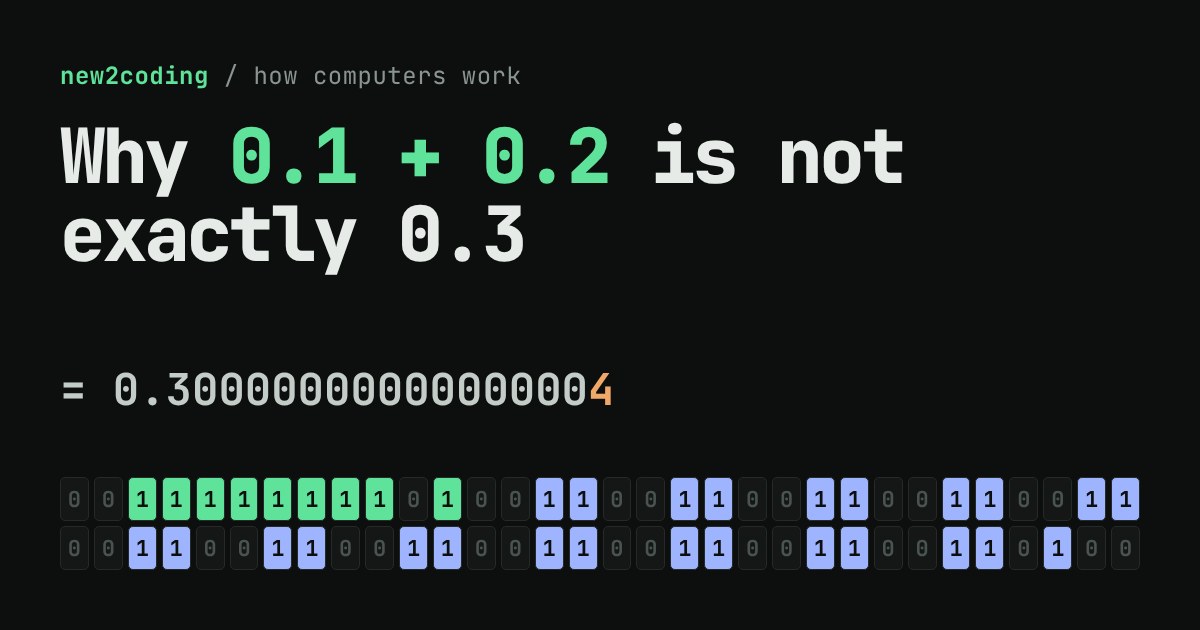
Open a JavaScript console or a Python prompt and type 0.1 + 0.2. You expect 0.3. You get this instead:
// JavaScript
0.1 + 0.2          // 0.30000000000000004
0.1 + 0.2 === 0.3  // false

# Python
>>> 0.1 + 0.2
0.30000000000000004
>>> 0.1 + 0.2 == 0.3
False
This is not a bug in either language, and it is not your mistake. It is what happens when a computer stores a decimal number using only zeros and ones. By the end of this article you will be able to see exactly which bits are stored, and why the answer ends in a stray 4.
A warm-up: one third in decimal
Try writing one third as a decimal. You get 0.3333…, and the threes never stop. Any finite number of digits is slightly wrong: 0.3333 is a little less than a third. Nobody is surprised by that, because ten (our number base) cannot divide evenly by three.
Computers count in base 2, where each place is worth half the one before it: a half, a quarter, an eighth, and so on. A fraction ends cleanly in binary only if its bottom number, in lowest terms, is a power of two. So 0.5 (1/2), 0.25 (1/4) and 0.75 (3/4) are stored exactly. But 0.1 is 1/10, and 10 = 2 × 5. That factor of 5 means the binary version never ends:
0.1 in binary = 0.000110011001100110011001100110011…
                       (the pattern 0011 repeats forever)
A computer has to cut that pattern off somewhere. Just as 0.3333 is only close to a third, the stored 0.1 is only close to a tenth.
What is actually stored: 64 bits
Both JavaScript numbers and Python's float use a standard format called IEEE 754 double precision, which fits every number into 64 bits split into three fields:
1 sign bit (0 means positive, 1 means negative). 11 exponent bits, which say how far to slide the binary point, much like the power of ten in scientific notation. 52 fraction bits, which hold the digits themselves. For ordinary numbers the value works out as ±1.fraction × 2^(exponent − 1023), where the leading 1 is implied and never stored.
Play with the real thing below. Type a number, or tap any bit to flip it, and watch the exact value the computer holds.
What to look for
Press 0.1. The exact value is 0.1000000000000000055511151231257827…, slightly more than a tenth, because the repeating pattern had to be rounded to fit in 52 fraction bits. Now press 0.2: also slightly high. Press 0.3: this one is slightly low, 0.29999999999999998889….
Now press 0.1 + 0.2. The two stored values are added exactly, and the true total is 0.3000000000000000166533453693…. That total does not fit in 64 bits either, so the computer rounds to the nearest double. Two doubles sit on either side of it: the stored 0.3 below, and a neighbour above it. In this case the exact total lands precisely halfway between them. A tie like this is settled by a standard rule (round to the choice whose last bit is 0), which picks the upper neighbour. That neighbour is 0.3000000000000000444…, and the shortest text that identifies it is 0.30000000000000004. Compare the last bits in the grid with the ones for 0.3: they differ in the last three bits.
Each double is one step from the next. You can see this by flipping the very last bit of any number: the value changes by a tiny, fixed amount for that size of number. Nothing exists between neighbours, so every answer gets pulled onto the nearest one.
The same in Python, the same everywhere
Python's float is the same 64-bit format, and so are numbers in Ruby, Java (double), C, Go (float64) and most other languages. If you add 0.1 ten times in a loop you do not get 1 either:
acc = 0.0
for _ in range(10):
    acc += 0.1
print(acc)         # 0.9999999999999999
print(acc == 1.0)  # False
Small errors can pile up like this over many additions, which is why you will sometimes see long strings of nines in a result.
So what should I do in my own code?
Never use == on decimal fractions that came from arithmetic. Check whether two numbers are close enough instead:
// JavaScript
Math.abs(0.1 + 0.2 - 0.3) < 1e-9   // true

# Python
import math
math.isclose(0.1 + 0.2, 0.3)       # True
The size of "close enough" depends on your problem. Pick it on purpose rather than copying a number.
For money, count in whole units. Store prices as integer cents (1999 instead of 19.99). Whole numbers are stored exactly, up to 9,007,199,254,740,991 in JavaScript's Number, so 10 + 20 === 30 always holds. Convert to dollars only when you display the result. Many languages also offer an exact decimal type for this, such as Python's decimal module, where Decimal('0.1') + Decimal('0.2') == Decimal('0.3') is True.
Round only for display. Writing (0.1 + 0.2).toFixed(2) gives the text "0.30", which is perfect for a screen. Keep the full-precision number for further calculations.
The takeaway
A computer does not store 0.1. It stores the closest number it can build from 64 bits, and that number is a hair away from a tenth. Most of the time the difference is invisible, and now you know where it hides when it is not. If a decimal calculation looks off by a tiny amount at the very end, you are almost certainly looking at rounding, not a broken program.