computer-science/merge-sort-how-splitting-a-list-in-half-again-and-again-sorts-it-with.md
Merge sort: how splitting a list in half again and again sorts it with far less work
How do you sort 10,000 numbers without making millions of comparisons? Merge sort never sorts a big pile. It splits the list until every piece has one item, which is already sorted, then merges the pieces back by comparing only the fronts.
Step through the splits and merges on eight numbers, read the short Python version, and see real comparison counts against insertion sort: about 200 times fewer on 10,000 items. You will also learn what merge sort costs and why `sorted()` in Python uses a relative of it.
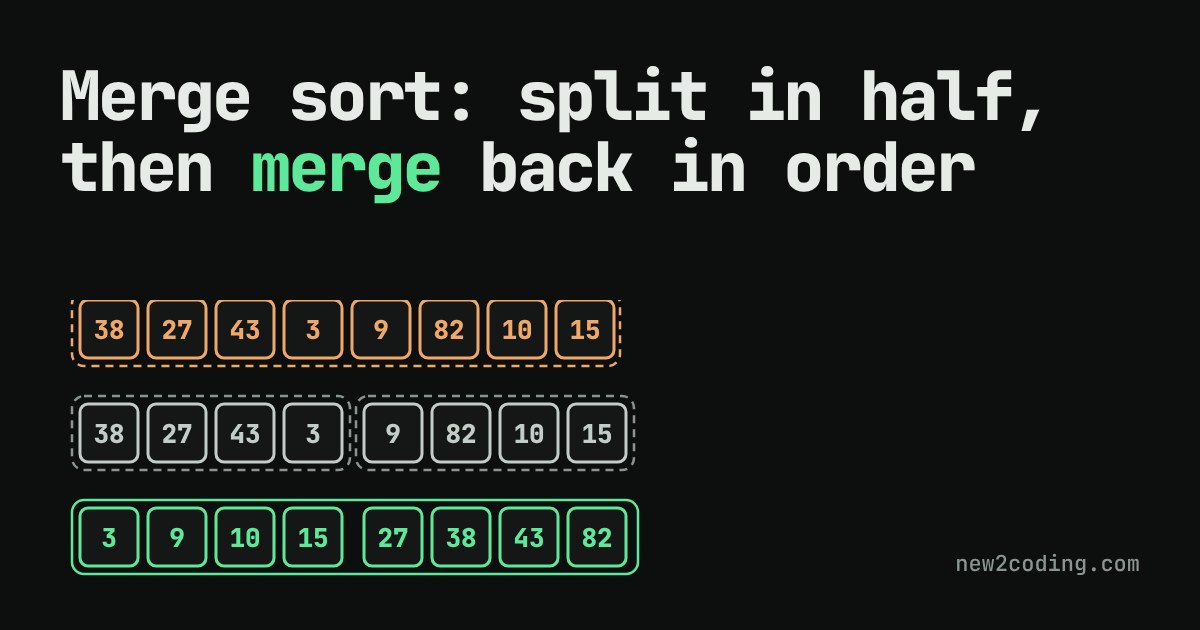
Sorting a list sounds like a job for patience: compare things, swap them, repeat. The simple ways to do it work, but they get painfully slow as the list grows. Merge sort is a different idea. It never tries to sort a big pile. It splits the pile until each piece is so small that it is already sorted, then joins the pieces back together in order. This article shows that happening step by step, then measures how much work it saves.
The trick: two sorted lists are easy to join
Suppose you have two lists that are already sorted: [3, 27, 38, 43] and [9, 10, 82]. Joining them into one sorted list needs very little thinking. Look only at the front of each list. The smaller front item must be the smallest item overall, because everything behind it in its own list is bigger. Take it, then look at the fronts again.
That operation is called a merge. You never look back and never compare anything twice, so merging two lists with 7 items in total takes at most 6 comparisons.
But that only helps if you already have two sorted lists. Where do they come from? From the same trick, used again.
Split until it is trivial, then merge back up
A list with 0 or 1 items is already sorted, since there is nothing to put out of order. So merge sort does this:
- If the list has 0 or 1 items, return it as it is.
- Otherwise cut it into a left half and a right half.
- Sort each half by using merge sort on it (a function that calls itself like this is called recursive).
- Merge the two sorted halves into one sorted list.
Step 3 sounds like cheating, but it works: each half is smaller than the list you started with, so the splitting always ends at lists of one item.
Watch it work
Press Next to step through merge sort on eight numbers. Dashed boxes are groups that are not sorted yet. Green boxes are sorted groups. When two groups are being merged, the orange boxes are the two fronts being compared, and the Output row fills up with the winner each time. Press Shuffle for a new list.
Notice two things. First, all the comparing happens during merges, and every merge only looks at fronts. Second, the list is cut in half at each level, so there are only a few levels: 8 items need 3 levels of splitting, and 1,000 items need only 10.
The code
This is the whole algorithm in Python. The merge function is the "compare the fronts" step, with i and j marking the front of each list.
def merge(left, right):
    result = []
    i = j = 0
    while i < len(left) and j < len(right):
        if left[i] <= right[j]:
            result.append(left[i]); i += 1
        else:
            result.append(right[j]); j += 1
    result.extend(left[i:])    # one side ran out; the rest of
    result.extend(right[j:])   # the other side is already in order
    return result

def merge_sort(items):
    if len(items) <= 1:
        return items
    middle = len(items) // 2
    return merge(merge_sort(items[:middle]), merge_sort(items[middle:]))

print(merge_sort([38, 27, 43, 3, 9, 82, 10]))
print(merge([3, 27, 38, 43], [9, 10, 82]))
Running it prints:
[3, 9, 10, 27, 38, 43, 82]
[3, 9, 10, 27, 38, 43, 82]
One small detail: the test uses <=, not <. When two items are equal, the left one goes first, so equal items keep their original order. A sort with that property is called stable, and it matters when you sort, say, people by city and want people in the same city to stay in the order they already had.
How much work does it save?
Each level of merging looks at every item about once, and there are about log2(n) levels (that is how many times you can halve n before reaching 1). So the work grows like n × log n. A simple method such as insertion sort, which slides each item back into place one by one, can need around n × n comparisons on shuffled data.
Here are real counts from running both on random lists of different sizes (the same lists for both methods):
| Items | Merge sort comparisons | Insertion sort comparisons |
|---|---|---|
| 10 | 24 | 26 |
| 100 | 540 | 2,421 |
| 1,000 | 8,725 | 247,100 |
| 10,000 | 120,420 | 24,866,454 |
With 10 items there is no real difference. With 10,000 items, merge sort does about 200 times less comparing. Ten times more data cost merge sort roughly 14 times more work, but cost insertion sort roughly 100 times more. This is the kind of growth that the notation Big O describes: merge sort is O(n log n), and insertion sort is O(n²) in the typical case.
What it costs
Merge sort is not free. While merging, it builds a new list for the output, so it needs extra memory roughly the size of the list. Simple in-place methods avoid that. Also, for tiny lists, the bookkeeping can cost more than it saves, which is why real libraries often switch to a simple method for small pieces.
What this means for your own code
You will rarely write merge sort yourself. Python's built-in sorted() and list.sort() use an algorithm called Timsort, which combines merging with insertion sort on small runs, and it is stable like the version above. Use the built-in. What you take away is the idea: if a problem is hard at full size, ask whether you can cut it in half, solve the halves, and combine the answers cheaply. Merge sort is the classic example of that approach, called divide and conquer, and binary search is a close cousin.