infrastructure/ci-pipelines-how-a-computer-decides-a-change-is-safe-to-merge.md
CI pipelines: how a computer decides a change is safe to merge
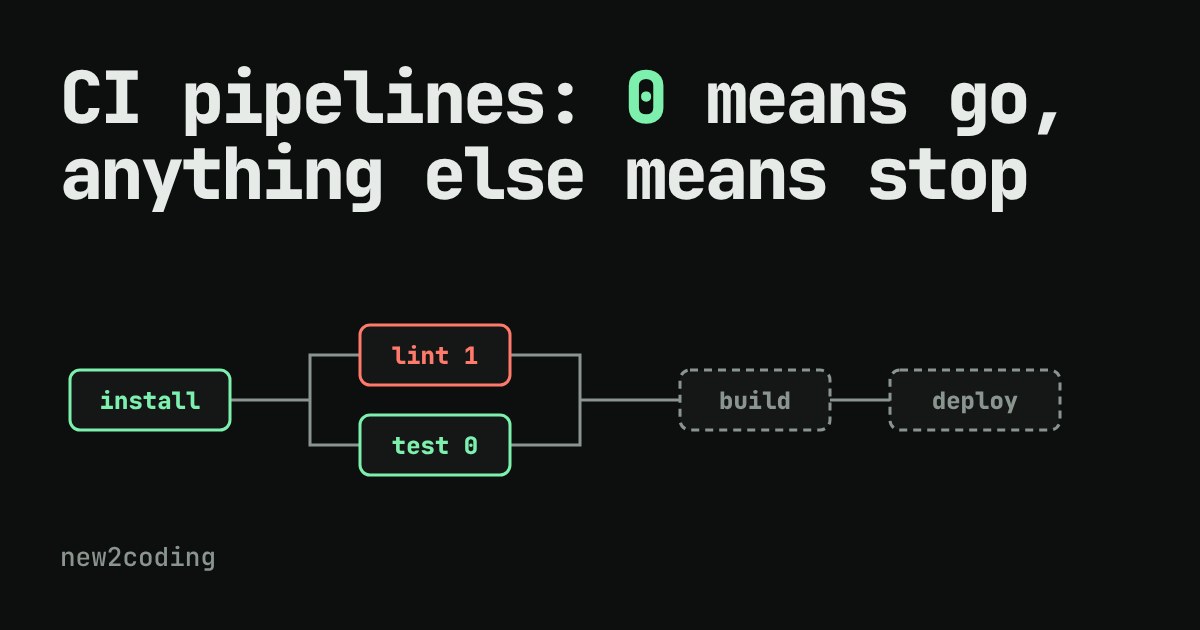
Push a change and a green tick or a red cross appears a minute later. How does a machine decide? It does not understand your code. It reads one number from every command, the exit code, where 0 means fine and anything else means failure.
This article builds a pipeline from a plain shell script you can run, explains how jobs wait for each other, and gives you a simulator where you break any job and watch the rest get skipped.
What happens after you push your code?
You change one line, send it to a shared place such as GitHub, and a minute later a small green tick or a red cross appears next to your change. Nobody typed anything. A computer ran a list of checks for you. That list is called a CI pipeline. CI stands for continuous integration, which is a long name for a simple habit: every time someone adds a change, a machine automatically checks that the project still works.
The useful question is how the machine decides between tick and cross. It does not understand your code. It relies on one very old, very small idea, and once you see it you can read almost any pipeline.
The idea: every command ends with a number
When a program finishes, it hands back a number called its exit code. By convention, 0 means "that went fine" and any other number means "something went wrong". Your terminal does this all the time, you just never see it. Test tools, linters (programs that look for style problems and likely mistakes) and build tools all follow the convention, so a pipeline only has to look at the number.
Here is a tiny pipeline written as a plain shell script. The && operator means "run the next command only if the previous one returned 0". The third step pretends one test failed:
#!/bin/bash
run() { echo "> $*"; "$@"; code=$?; echo "  exit code: $code"; return $code; }
run bash -c 'echo "installing..."; exit 0' &&
run bash -c 'echo "lint: ok"; exit 0' &&
run bash -c 'echo "test: 1 failed"; exit 1' &&
run bash -c 'echo "deploying..."; exit 0'
echo "pipeline finished with code: $?"
Running it gives this real output:
> bash -c echo "installing..."; exit 0
installing...
  exit code: 0
> bash -c echo "lint: ok"; exit 0
lint: ok
  exit code: 0
> bash -c echo "test: 1 failed"; exit 1
test: 1 failed
  exit code: 1
pipeline finished with code: 1
Look at what is missing: the word deploying never appears. The failed test returned 1, the chain stopped, and the last step was skipped. That is the whole safety feature. A broken change never reaches the "deploy" step because the step before it said no.
Stages, and who waits for whom
Real pipelines are rarely one straight line. Checking style and running tests do not depend on each other, so they can run at the same time to save minutes. Building the finished program needs both of them to be happy first. Pipelines describe this with a "needs" list: each job names the jobs it must wait for.
The rules are short:
1. A job with no "needs" starts straight away, alongside the others. 2. A job that needs other jobs waits until all of them have passed. 3. If any needed job fails, the waiting job is skipped, and so is everything that needs it. 4. Jobs that did not depend on the failure still finish, so you get the full list of problems in one go.
Try it. Each row below is a job. Press a "Make fail" button to give that job exit code 1, then run the pipeline.
Things worth trying: fail only lint and notice that test still runs. Fail install and watch everything downstream get skipped, because nothing could work without it. Fail nothing, and deploy is finally allowed to go.
What it looks like in a real file
Pipelines are usually written in a configuration format called YAML. This example is for GitHub Actions, one popular service (others, like GitLab CI, use different keywords for the same ideas). It lives in a file under .github/workflows/ in your project:
name: CI
on: [push, pull_request]
jobs:
  test:
    runs-on: ubuntu-latest
    steps:
      - uses: actions/checkout@v4
      - run: npm ci
      - run: npm test
  deploy:
    needs: test
    runs-on: ubuntu-latest
    steps:
      - run: echo deploying
Read it from the top. on says when to run: on every push and every pull request (a proposal to merge your change into the main project). runs-on picks the kind of fresh machine to borrow. Each run line is a shell command, and if it returns a non-zero exit code, the remaining steps of that job are skipped by default. needs: test is rule 2 from earlier: deploy waits for test and is skipped if it fails.
Why a fresh machine matters
You may wonder why the pipeline does not simply use your laptop's results. It runs on a clean machine on purpose. If your tests only pass because of a file that exists on your computer and nowhere else, a clean machine catches it. "Works on my machine" is the classic bug that CI exists to find.
What to take away for your own code
Three habits make pipelines work for you. First, make your commands honest: a script that prints "error" but exits with 0 will fool the pipeline, so end failed scripts with a non-zero code (in many languages that is exit(1)). Second, keep checks fast, because a pipeline people wait ten minutes for is one people start to ignore. Third, treat a red cross as information, not an insult: it means the machine found a problem before your users did.
Next time a tick or a cross appears beside your change, you know what sits behind it: a list of commands, a number from each, and a few simple rules about who waits for whom.