computers/endianness-why-the-bytes-of-a-number-can-be-stored-backwards.md
Endianness: why the bytes of a number can be stored backwards
Store the number 0x12345678 in memory and you might expect the bytes in the order 12 34 56 78. Most laptops and phones store them as 78 56 34 12 instead.
This is endianness: the order a computer puts the bytes of a number into memory. Neither order is wrong, but two systems that disagree will read the same bytes as two different numbers. Try it yourself: store a number one way, read it back the other way, and watch port 80 turn into 20,480.
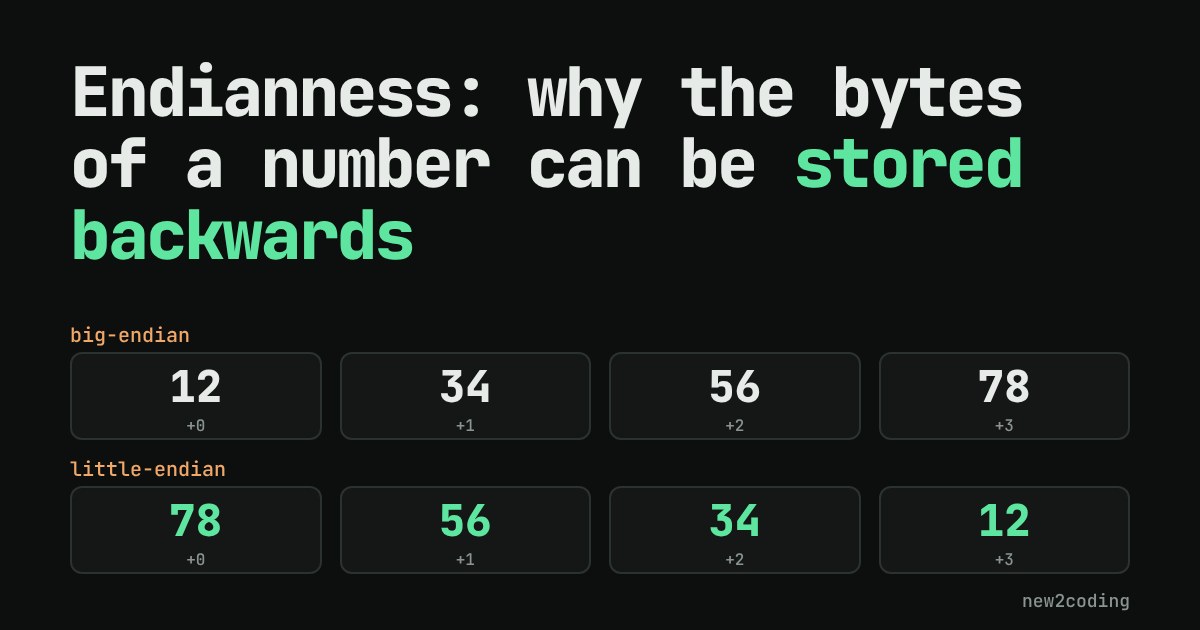
Take the number 0x12345678. (The 0x means the digits are written in hexadecimal, base 16, which is a compact way to write bytes: two hex digits make exactly one byte.) That number needs four bytes: 12, 34, 56 and 78. Memory is a long row of numbered slots, one byte per slot. So which byte goes in the first slot?
You might expect 12 first, the same order we write it. On the phone or laptop you are probably using, the answer is the opposite: 78 goes first. Neither choice is wrong. They are two conventions, and trouble starts when two computers disagree about which one they are using.
Two ways to order bytes
The order is called endianness (or byte order). There are two kinds:
Big-endian stores the "big end" first: the most significant byte, the one worth the most, goes in the lowest address. It reads like we write numbers: 12 34 56 78.
Little-endian stores the "little end" first: the least significant byte goes in the lowest address: 78 56 34 12.
The words come from Gulliver's Travels, where two kingdoms go to war over which end of a boiled egg to crack. Computer scientists borrowed the joke because the argument felt just as arbitrary. In practice, the processors in most laptops, desktops and phones today (x86-64 and ARM as they are normally run) are little-endian, while the internet's protocols chose big-endian.
You can ask Python how your machine does it, and ask it to lay out a number either way:
import sys
n = 0x12345678
print(sys.byteorder)
print(n.to_bytes(4, "big").hex(" "))
print(n.to_bytes(4, "little").hex(" "))
Running that gives:
little
12 34 56 78
78 56 34 12
The first line is the machine this was run on, and yours will most likely say little too. The next two lines are the same number in the two orders.
Try it: store a number, then read it back
Try 000000FF (that is 255) with the writer little-endian and the reader big-endian. The reader gets 4,278,190,080. Nothing was corrupted: all four bytes arrived in place. The reader simply gave each byte the wrong weight.
Why the weights matter
Every byte in a number has a place value, just like digits in 3,105: the thousands digit is worth more than the ones digit. In a four-byte number the first byte (in the big-endian convention) is worth 256×256×256 = 16,777,216 per step, the next 65,536, then 256, then 1. A reader has to know which byte carries which weight. Bytes alone don't say.
Here is the same four bytes read both ways:
data = bytes([0x78, 0x56, 0x34, 0x12])
print(hex(int.from_bytes(data, "little")))
print(hex(int.from_bytes(data, "big")))
print(int.from_bytes(data, "little"), int.from_bytes(data, "big"))
0x12345678
0x78563412
305419896 2018915346Same bytes, two very different numbers: 305,419,896 and 2,018,915,346.
When it actually bites
Inside a single program on a single machine you almost never notice, because the processor does everything the same way every time. The problem shows up at the edges, whenever bytes cross from one system to another:
Networks. The core internet protocols, such as IP and TCP, write multi-byte numbers big-endian. This is called network byte order. A computer that is little-endian inside has to flip numbers on the way out and on the way in. For example, port 80 as a 16-bit number is the two bytes 00 50 on the wire.
Files. A file format that stores a multi-byte number has to say which order it uses. Some formats pick one and always use it, and some include a marker at the start so the reader can tell.
Reading raw bytes. If you decode bytes yourself, you choose the order. Python's struct module shows the mix-up clearly. Here we pack the port number 80 the network way (> means big-endian), then read it with the right and the wrong order:
import struct
packet = struct.pack(">H", 80)
print(packet.hex(" "))
print(struct.unpack("<H", packet)[0])
print(struct.unpack(">H", packet)[0])
00 50
20480
80Reading 00 50 in the wrong order turns port 80 into 20,480. A bug like this is easy to miss because nothing crashes: you get a plausible number that happens to be wrong.
What to take away
You rarely need to think about endianness in everyday code, and that is fine. Remember it for one situation: when you turn a number into bytes, or bytes into a number, you must know the order. Languages give you the tools to say it out loud, such as the "big" and "little" arguments above. If a number that comes out of a file, a network message or a binary format looks wildly wrong but the bytes look fine, check the byte order first. If the digits seem reversed in pairs, such as 0x78563412 instead of 0x12345678, that is almost always the cause.