web/stacking-contexts-why-z-index-9999-can-still-lose-to-z-index-2.md
Stacking contexts: why z-index: 9999 can still lose to z-index: 2
You give a dropdown z-index: 9999 and it still hides behind a box that only says 2. The number is not too small: browsers sort layers in separate bundles called stacking contexts, and a number only counts inside its own bundle.
Learn what quietly creates a bundle (even opacity: 0.99 does), play with two overlapping boxes to see why a 9999 can lose to a 1, and use a short console script to find the ancestor that is trapping your element.
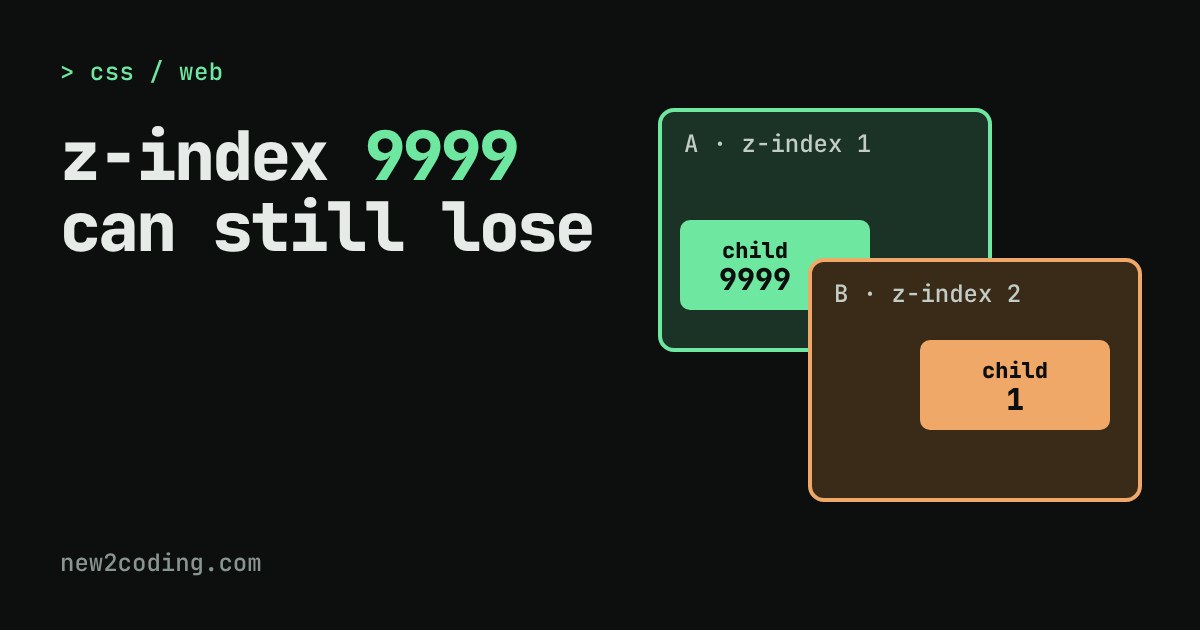
You give a dropdown menu z-index: 9999 and it still hides behind the box below it. You try 99999. Nothing changes. The number is not too small. It is being compared in the wrong place.
z-index only compares neighbours
z-index decides which of two overlapping elements is drawn on top: the higher number is nearer to your eye. But the browser does not sort every element on the page into one long line. It sorts them in groups. Each group is called a stacking context, which means a self-contained bundle of layers.
Picture a desk with envelopes on it. Each envelope holds a few sheets of paper. Inside one envelope you order the sheets by their numbers. Then the whole envelope goes on the desk as a single item, and the envelopes are ordered by their own numbers. A sheet marked 9999 inside envelope 1 never gets above envelope 2. It is only the top sheet of envelope 1, and envelope 1 sits below envelope 2.
That is the whole idea. A child's z-index only means something inside its nearest stacking context. Once that context has been placed, the child goes wherever its envelope goes.
What creates an envelope
The page's root element, <html>, is always one. Beyond that, an element becomes a stacking context when it has certain CSS. Some of these are obvious. Others are surprises, because on the face of it they have nothing to do with layering.
| You write | New stacking context? |
|---|---|
position: relative alone | No |
position: relative; z-index: 1 | Yes |
z-index: 5 on a position: static box | No: the z-index is ignored (flex and grid items are the exception) |
position: fixed or sticky | Yes, even with no z-index |
opacity: 0.99 | Yes: any opacity below 1 |
transform: translateY(0) | Yes: any transform other than none |
filter, clip-path, mask, perspective | Yes, when set to anything but none |
isolation: isolate | Yes: that is its only job |
That is not the full list (will-change, contain and a few more also do it, and MDN keeps the complete one), but it covers most real bugs. The sneaky ones are opacity and transform. You add a fade or a hover animation to a card, and without meaning to you have put everything inside that card into an envelope.
Try it: sort the envelopes
Below are two boxes, A and B. Each holds a small child, and the two children overlap. Change the CSS with the menus and watch which child ends up on top. The page reads the real styles from your browser to decide which boxes are envelopes, then lists the layers from front to back. Start with the four presets.
What the presets show
No contexts. A-child (9999) beats B-child (1). Neither box is an envelope, so both children sit loose in the page's one big pile, and their numbers meet head-on.
z-index on parents. Both boxes are position: relative with z-index 1 and 2. Now each is an envelope, and envelope B (2) sits above envelope A (1). B-child wins even though A-child says 9999, because that 9999 was only ever compared with other things inside A.
Sneaky opacity. Box A has no z-index at all, just opacity: 0.99, maybe for a fade effect. That alone makes A an envelope, placed at layer 0. B-child, with a plain 5, is loose in the page's pile and lands above it.
Fix: raise A. Give A the higher z-index and the whole envelope, A-child included, moves above B. Try picking two envelopes with the same number: the one that comes later in the HTML wins the tie.
Finding the envelope in your own page
When a z-index will not work, walk up from the element that is stuck and ask each ancestor whether it is an envelope. Browser dev tools can show this, but a short script makes the rule visible. Paste it into your browser console, with your own selector at the end.
function whyContext(el) {
  const s = getComputedStyle(el), r = [];
  if (el === document.documentElement) r.push("it is the root element");
  if (s.position === "fixed" || s.position === "sticky") r.push("position: " + s.position);
  else if (s.position !== "static" && s.zIndex !== "auto")
    r.push("position: " + s.position + " + z-index: " + s.zIndex);
  if (parseFloat(s.opacity) < 1) r.push("opacity: " + s.opacity);
  if (s.transform !== "none") r.push("transform");
  if (s.filter !== "none") r.push("filter");
  if (s.isolation === "isolate") r.push("isolation: isolate");
  const ps = el.parentElement && getComputedStyle(el.parentElement);
  if (ps && /flex|grid/.test(ps.display) && s.zIndex !== "auto")
    r.push("flex/grid item with z-index: " + s.zIndex);
  return r;
}

function stackingChain(el) {
  for (let n = el; n; n = n.parentElement) {
    const why = whyContext(n);
    if (why.length)
      console.log(n.tagName.toLowerCase() + (n.className ? "." + n.className : "") + " -> " + why.join(", "));
  }
}

stackingChain(document.querySelector(".dropdown"));
I ran it on a page with a <nav class="menu" style="opacity: 0.95"> holding a dropdown with position: absolute; z-index: 9999, followed by a <main> with position: relative; z-index: 2. The dropdown was drawn behind main. The output:
ul.dropdown -> position: absolute + z-index: 9999
nav.menu -> opacity: 0.95
html -> it is the root element
The first line is the dropdown's own envelope, which only matters for its own children. The line to read is the second one. nav.menu is an envelope because of its opacity, so it sits at layer 0 next to main at layer 2, and the 9999 inside it never gets a say. Giving the nav position: relative; z-index: 3 put the dropdown on top again when I tried it.
Fixing it, and keeping it fixed
Once you have found the envelope that matters, you have a few honest options. You can give that envelope the number it needs, as the nav above got 3. You can move the element out of the envelope: menus and pop-up dialogs are often placed last in <body> for exactly this reason, so no ancestor can trap them. Or you can remove the accidental cause, such as an opacity that does nothing useful.
You can also use envelopes on purpose. Putting isolation: isolate on a component, such as a card with a badge at z-index: 2 inside, means those inner numbers can never leak out and fight with the rest of the page. It is a clean way to stop an arms race before it starts.
Speaking of which: if your stylesheet has a 9999 and a 99999, that is a hint that a hidden envelope is somewhere above you. Inside one envelope you rarely need numbers bigger than 1, 2 and 3.
Remember
A z-index is a rank among siblings in the same envelope, never a rank across the whole page. When it seems to be ignored, look at the ancestors, not at the number.